The Hidden Problem: Field History Tracking Is Easy. Audit Architecture Is Hard.
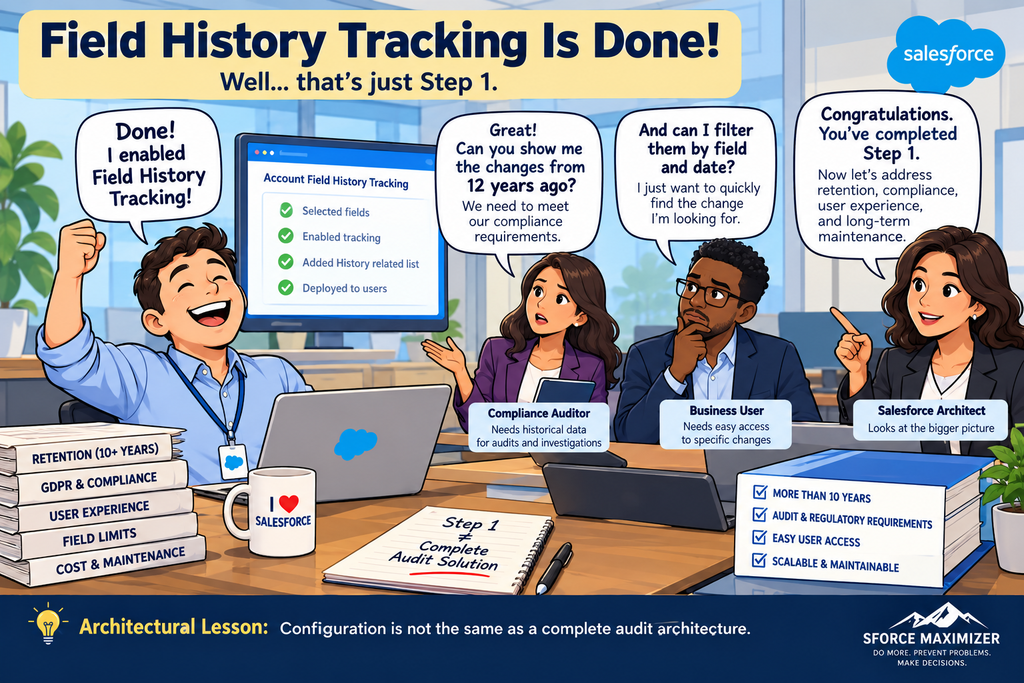
Have you ever implemented Salesforce Field History Tracking and thought, “That was easy!”? Select the fields, enable history tracking, add the History related list to the record page, and you’re done. Well, not quite! I learned this firsthand while working as a Security Architect on a global Salesforce implementation. The business had what initially appeared to be a straightforward requirement: track changes to important Salesforce fields so users and auditors could understand what changed, when it changed, and who made the change.
But three additional requirements made the solution significantly more complicated. First, the organization needed to retain field history for more than 10 years. Standard Salesforce Field History Tracking was not designed to satisfy that retention requirement on its own. Second, the implementation had to address GDPR and other compliance obligations. Retaining historical information was only part of the challenge. We also needed to consider how historical data would be governed, protected, accessed, and eventually disposed of in accordance with applicable requirements. Third, business users wanted an easy way to view historical changes. They didn’t want to navigate multiple tools or understand where Salesforce stored recent versus archived history. They simply wanted to open a record and understand how its information had changed over time.
And then there were Salesforce’s field tracking limits. What started as a simple configuration requirement had evolved into a much broader architectural problem. We needed to answer several questions:
- Which fields genuinely required historical tracking?
- How would we retain history for more than 10 years?
- How would we address privacy and compliance obligations without retaining information unnecessarily?
- How could business users access recent and archived changes without navigating multiple interfaces?
- How could we deliver this without creating a custom solution that would become expensive to maintain?
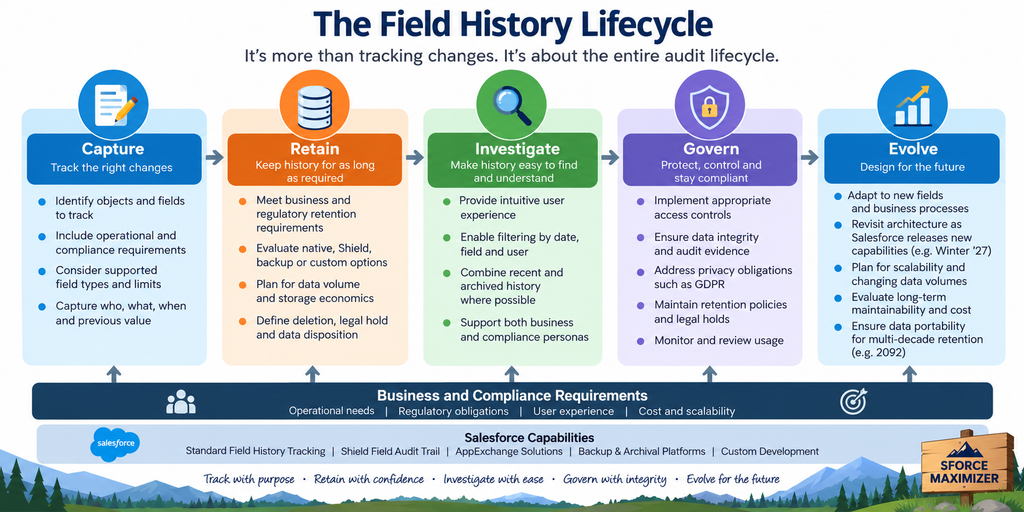
This is where I believe architects need to change how they approach field history tracking. The architectural challenge is not just capturing field changes. It is designing a solution that can track, retain, govern, and present those changes throughout their required lifecycle. Salesforce offers several options, including standard Field History Tracking, Shield Field Audit Trail, AppExchange applications, backup solutions, and custom tracking approaches. But selecting the right solution requires understanding the business requirements before selecting the Salesforce feature.
2. Understanding the Salesforce Field History Tracking Options
When you need to retain Salesforce field history for several years, your first instinct might be to look at Salesforce Shield Field Audit Trail. And that is a reasonable starting point. But as architects, our responsibility is not simply to select the feature that meets the retention requirement. We need to evaluate the organization’s existing technology investments, compliance obligations, cost, and user experience.
Let’s examine the major options.
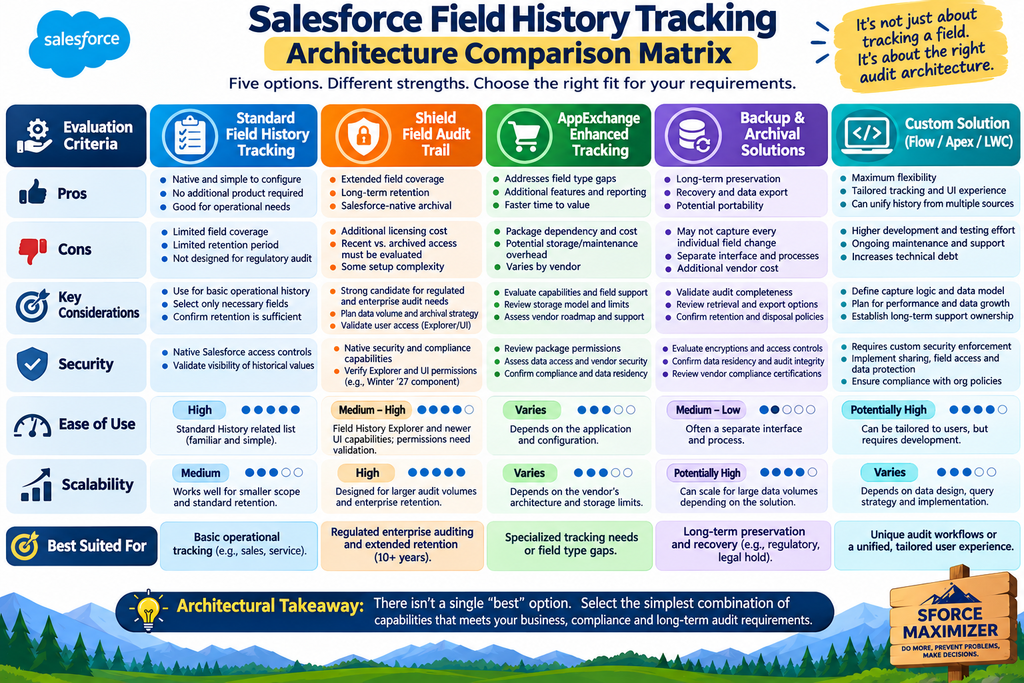
Option 1: Standard Salesforce Field History Tracking
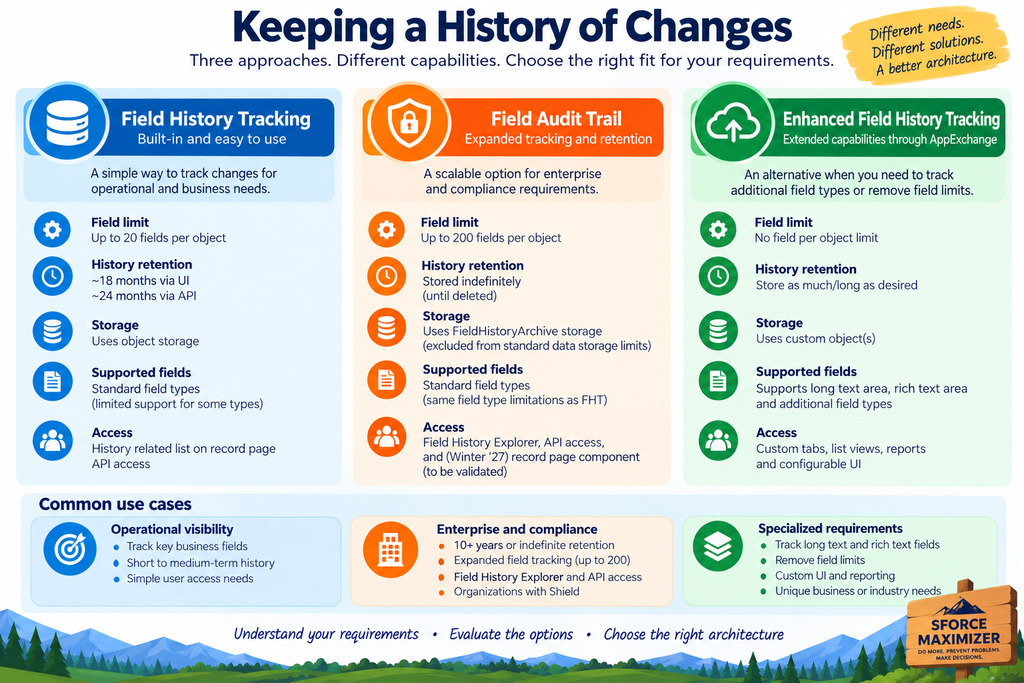
Standard Field History Tracking is the simplest place to start. It allows administrators to select fields for tracking and view changes through the corresponding history related list.For many operational requirements, this may be sufficient. For example, a sales manager may want to understand who changed an opportunity’s stage or when an Account field was modified. However, standard Field History Tracking has limitations.
Traditionally, it supports tracking up to 20 fields per object, with history available for approximately 18 months through the user interface and up to 24 months through the API, subject to Salesforce’s applicable retention behavior. It also has limitations on certain field types like rich text and the historical values available for them. For organizations with extensive compliance requirements, standard tracking alone may not be sufficient.
Option 2: Salesforce Shield Field Audit Trail
Field Audit Trail extends Salesforce’s native field history capabilities. It supports expanded field tracking and archival retention through the FieldHistoryArchive Big Object. Current Salesforce documentation describes support for up to 200 tracked fields per object with Field Audit Trail and the ability to retain archived history indefinitely until it is deleted, subject to the applicable product configuration and policies.
In our global Salesforce implementation, the customer already had Salesforce Shield because of broader security and encryption requirements. This made Field Audit Trail a natural candidate. Rather than introducing another technology solely for audit retention, we could leverage an existing Salesforce investment. However, selecting Field Audit Trail addressed only part of the problem. We still needed to determine how business users would access historical information.
Option 3: Enhanced Field History Tracking Through AppExchange
Another option is to evaluate applications such as Enhanced Field History Tracking, available through Salesforce’s marketplace. These applications may extend tracking functionality beyond standard Salesforce capabilities. For example, some solutions can support additional field types, including Long Text Area and Rich Text Area fields, and store history in custom objects. This can be useful when native tracking limitations prevent an organization from meeting specific requirements.
But there are tradeoffs. Architects need to evaluate the underlying storage model, package dependencies, ongoing maintenance, security, and potential data growth. An application that removes a field tracking limitation does not automatically solve long-term retention or compliance requirements.
Option 4: Enterprise Backup and Archival Solutions
This is an option I believe architects should evaluate more seriously, particularly for very long retention requirements. In our global implementation, we evaluated a backup solution alongside Shield Field Audit Trail. Backup platforms can preserve historical copies of Salesforce data and may offer capabilities for comparison, recovery, and long-term archival.
However, an important distinction remains. A backup is not automatically a complete field-level audit trail. For example, a daily backup may capture the value of a field at the time of the backup but miss multiple intermediate changes during that day. Architects need to validate whether the solution preserves the required field-level changes, timestamps, user attribution, and evidence needed for audit investigations. This becomes especially important when retention requirements extend across decades.
Option 5: Custom Field History Tracking
Finally, organizations may consider custom solutions using Flow, Apex, custom objects, or Lightning Web Components. Custom solutions provide flexibility. They can be designed around specific business processes, specialized field types, or unique user experience requirements. But flexibility comes with responsibility. The organization must own the solution’s development, security, testing, storage, scalability, and maintenance. I recommend avoiding custom development unless a clearly documented requirement shows existing capabilities cannot reasonably satisfy it.
The Architectural Lesson
There is no universal winner. Standard tracking may be sufficient for operational history. Shield may be appropriate for regulated enterprise retention. AppExchange applications may address specialized tracking gaps. Backup and archival solutions may support long-term preservation. Custom development may be justified for unique requirements. The right answer depends on the organization’s needs.
3. One Record, Multiple History Stores: Designing for Audit Usability
Let’s assume you’ve solved the first two problems. You know which fields to track, and you’ve selected a solution to retain the history for the required period. Are you done? Not necessarily. One of the biggest challenges we encountered in our global Salesforce implementation was making historical changes accessible to the people who actually needed them.
The Problem: History Exists, but Can Users Find It?
Salesforce can store recent field history in standard history objects, such as AccountHistory, while Shield Field Audit Trail provides archival storage through FieldHistoryArchive. From a technical perspective, these capabilities address different parts of the history lifecycle. But business users don’t care which Salesforce object stores the information. They want answers to straightforward questions:
- Who changed this field?
- What was the previous value?
- When did the change happen?
- What changes occurred during a particular period?
- Can I quickly find the specific change I’m investigating?
Imagine a customer service representative trying to determine when an important Account field was modified. Now imagine a compliance auditor reviewing changes to that same Account over several years. Both users need historical information, but they approach it differently. The service representative may want to investigate one specific field. The compliance auditor may need to examine a broader history of changes within a particular date range. Neither wants to scroll through hundreds of history records looking for the relevant entry.
Our Approach: One Unified History Timeline
In our implementation, we built a custom Lightning Web Component that combined recent and archived field history into a single view. Rather than requiring users to understand the difference between standard history objects and archived history, we presented the information through one interface. We also introduced filtering capabilities.
Users could filter history by date and selected key fields, allowing them to quickly narrow results to the changes they cared about. This was especially useful because different user personas accessed the same information. Business users needed a simple way to investigate individual field changes while working on a Salesforce record. Compliance users needed an efficient way to review historical changes for audit and investigation. The goal wasn’t to build a sophisticated user interface for its own sake. It was to reduce the effort required to find relevant historical information.
Salesforce Field History Explorer
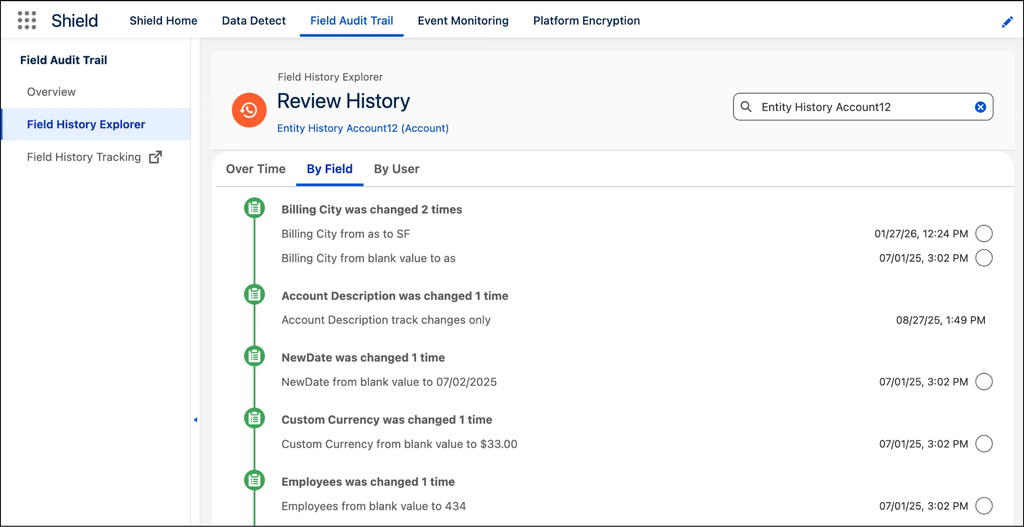
Salesforce Field History Explorer provides a dedicated experience for investigating historical changes. Users can examine history over time, by field, or by user. This is useful for investigations, particularly when working with archived audit information. However, the experience of navigating to a separate investigation tool may not always align with how business users work within individual Salesforce records.
What Winter ’27 Changes
Salesforce Winter ’27 introduces a standard Lightning component designed to expose Field Audit Trail information within the context of a Salesforce record page. That is a welcome improvement. Historically, presenting archived history directly within a record page could require custom development. However, the community discussion that inspired this article raises an important question:
Does the new component display both recent field history and archived field history, or only archived changes?
Initial community testing suggests that it displays full history (fetching data from history objects and the Field History Archive big object). This behavior should be verified against Salesforce documentation and tested in the target org before making an architectural decision. If the component only displays archived history, architects may still need to use both the standard History related list and the new Field Audit Trail component. That may be acceptable for some organizations. For others, particularly where compliance investigations require frequent historical analysis, a unified view may still justify additional development.
Caveat on the field history component: Based on community feedback, it seems users need view setup configuration permission or broader view all data, which will expose unwanted permissions to users. So please use this component with caution; it can be a good one for privileged users.
What Would I Do Differently Today?
At the time of our implementation, the newer Winter ’27 record-page component was not available. We needed to solve the problem with the capabilities available to us, and the custom LWC was our solution. Today, I would start by evaluating the new standard component before recommending custom development. If native capabilities meet the business requirements, I would prefer to leverage them rather than maintain custom code. But I would still validate the complete user experience.
The success of a field history tracking solution should be measured not only by how much history it retains, but also by how quickly users can find the right change.
4. Architectural Tradeoffs: Don’t Choose a Feature. Choose a Sustainable Solution.
One of the common mistakes I see in Salesforce architecture discussions is that we jump into solution selection too quickly. Should we use standard Field History Tracking? Should we buy Salesforce Shield? Is there an AppExchange application that can solve this? Or should we build something custom? These are reasonable questions. But I believe they are the wrong questions to start with.
Before evaluating Salesforce features, architects should establish what the business actually needs and how success will be measured.
Start With Requirements, Not Technology
When advising architects on field history tracking, I recommend starting with three areas.
1. Identify the fields that require tracking.
Not every field needs to be tracked. Architects should work with business stakeholders to identify which fields are important for operational investigations, compliance, or business accountability.
2. Identify the personas who need access to history.
A business user investigating one field change has different needs from a compliance auditor reviewing years of historical information. Understanding these personas helps determine whether standard related lists, Field History Explorer, or a specialized interface is necessary.
3. Establish compliance and retention requirements.
How long must historical information be retained? Are there regulatory requirements governing access, preservation, or deletion? Do different categories of historical data require different retention periods? These questions are particularly important in global and government implementations.
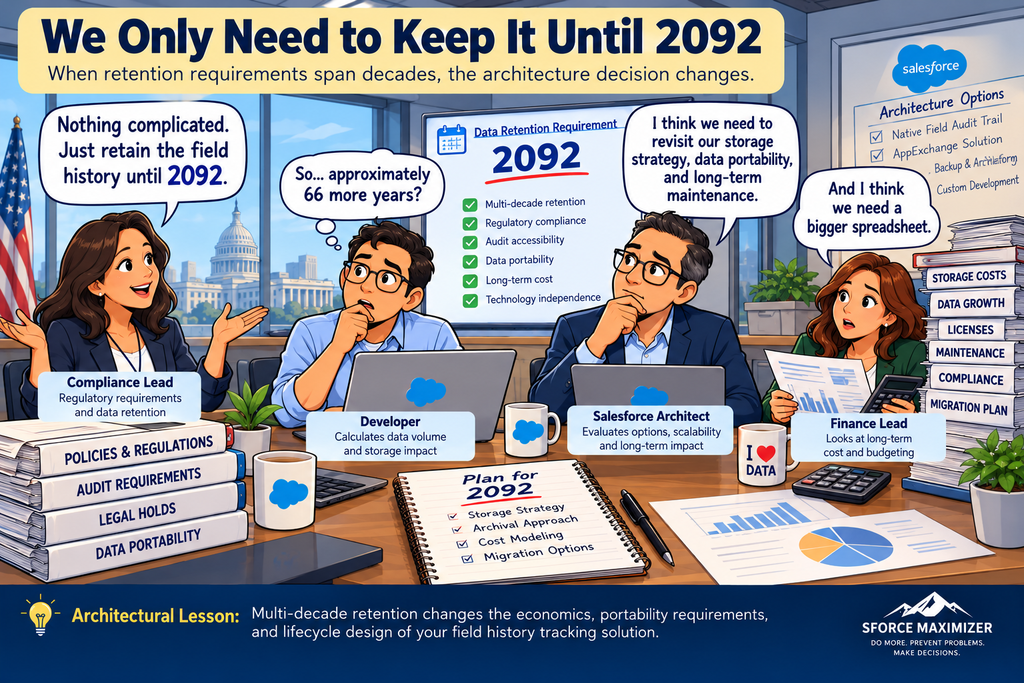
When Retention Extends to 2092
Let me share another example from a federal Salesforce project. The data retention requirement extends to 2092. Think about that for a moment. We’re not talking about retaining history for five or ten years. We’re talking about preserving information for more than six decades. This fundamentally changes the architecture discussion. For such requirements, I would evaluate backup and archival platforms alongside native Field Audit Trail capabilities. Why? Because the decision is no longer just about tracking fields.
We need to consider:
- How much historical data will accumulate over decades?
- What will the total cost of storage and retrieval be?
- Can the data remain accessible if the Salesforce platform or underlying applications change?
- Can historical evidence be migrated without losing integrity?
- How will the organization demonstrate compliance over the entire retention period?
- Can the solution support legal holds, retention policies, and authorized disposition?
Salesforce Field Audit Trail supports long-term retention, and its archival storage has different storage accounting from standard Salesforce data storage. Therefore, we should not assume that external backup will always be cheaper or better. Instead, we should evaluate the economics and capabilities of each option. A backup or archival solution may be attractive for very long retention periods, especially when enterprise portability and lifecycle management are important. But it must preserve the level of audit detail required by the business and compliance teams.
The longer the retention horizon, the more important storage economics, data portability, audit integrity, and technology independence become. Evaluate Total Cost, Not Just Licensing.
A custom solution may initially appear cheaper than purchasing additional licenses. But what happens when the organization needs to support it for the next 10 years? Who maintains the Apex code? Who updates the LWC when Salesforce introduces new capabilities? What happens as the volume of historical data grows? Similarly, an AppExchange application may reduce development effort but introduce recurring licensing and vendor support costs. Architects should evaluate total cost of ownership, not just initial implementation cost.
Design for Scalability and Maintainability
Field history requirements rarely remain static. New business processes introduce new fields. Compliance requirements evolve. More users need access to historical information. Data volumes continue to grow. A solution that works for a small implementation may not be appropriate for a large enterprise environment. Before selecting a solution, architects should understand how it will scale and who will own its long-term maintenance.
5. Introducing TRACE: A Reusable Field History Architecture Decision Framework
So how should architects make the final decision? My recommendation is to use a structured approach rather than comparing Salesforce features in isolation. I call this the TRACE Framework. TRACE combines a discovery checklist with a weighted architecture scorecard. Its purpose is to help architects select a solution based on requirements, compliance, usability, cost, scalability, and long-term maintainability.
T — Track: Identify What Needs to Be Audited
Start by identifying the objects, fields, and business changes that require tracking. Not every field needs to be audited. Determine which changes are operationally important, which require regulatory evidence, and which must be preserved for historical investigations.
R — Retain: Define the Retention Obligation
Establish how long historical information must be preserved and why. A five-year operational requirement is very different from a federal retention obligation extending to 2092. Consider the legal basis for retention, expected data volume, archival strategy, retrieval requirements, and eventual disposition.
A — Access: Understand Who Needs the History
Identify the personas who need historical information. Do business users need record-level visibility? Do compliance teams need filtering by field, user, and date? Must recent and archived history appear in one unified interface? The answers will influence the presentation architecture.
C — Compare: Evaluate the Alternatives
Compare standard Field History Tracking, Shield Field Audit Trail, AppExchange applications, backup and archival platforms, and custom solutions. Evaluate them against the organization’s requirements rather than assigning a universal ranking. A solution that is ideal for one organization may be inappropriate for another.
E — Evolve: Design for the Full Lifecycle
Finally, consider the long-term sustainability of the architecture. Can the solution scale as history volumes increase? Can the data be migrated if the platform changes? Can native Salesforce improvements replace existing custom development? Who owns maintenance, security, and operational support?
The right architecture is not simply the one that works today. It is the one that can continue meeting the organization’s requirements as technology and business needs evolve.
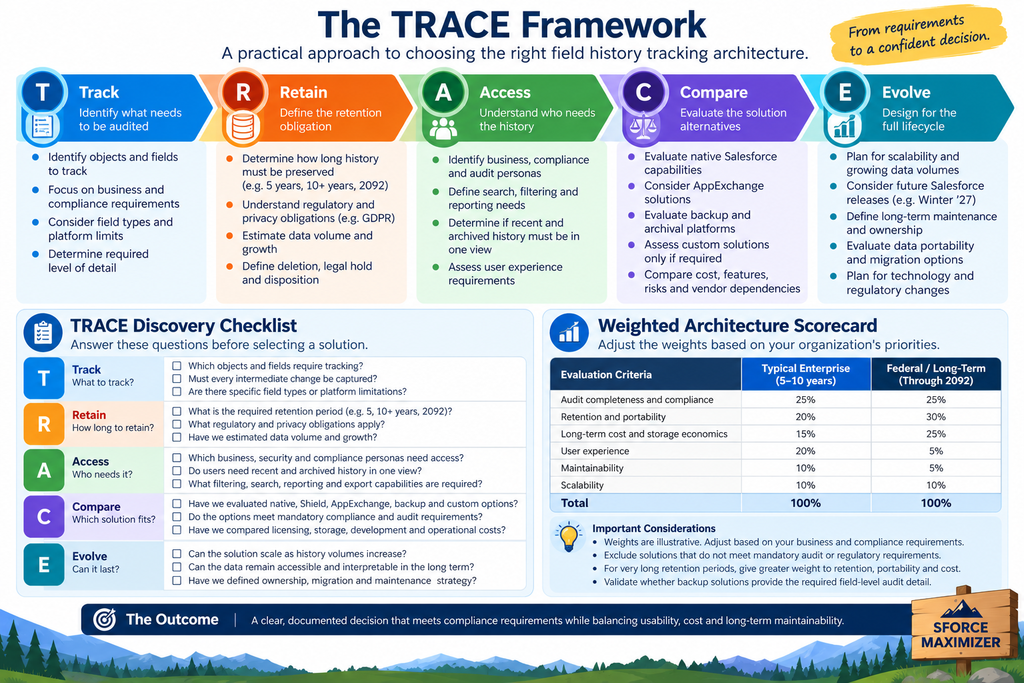
TRACE Discovery Checklist
Before evaluating a product, architects should answer these questions.
| TRACE dimension | Discovery questions |
|---|---|
| Track | Which objects and fields require tracking? Must every intermediate change be captured? |
| Retain | How long must history be preserved? What regulations and privacy obligations apply? |
| Access | Which personas need history? What filtering, search, and reporting capabilities are required? |
| Compare | Which native, AppExchange, backup, and custom options satisfy the mandatory requirements? |
| Evolve | How will the solution scale, remain maintainable, and preserve accessibility over time? |
The discovery process should establish mandatory requirements before scoring solution alternatives. For example, if the organization requires a complete field-level audit trail, a backup solution that only captures daily snapshots should not pass the evaluation simply because it has lower storage costs.
TRACE Weighted Architecture Scorecard
Not every organization should assign the same importance to each evaluation criterion. Consider two examples. The first is a typical enterprise implementation requiring several years of field history. The second is a federal implementation with retention requirements extending to 2092.
| Evaluation criterion | Typical enterprise | Retention through 2092 |
|---|---|---|
| Audit completeness and compliance | 25% | 25% |
| Retention and portability | 20% | 30% |
| Long-term cost and storage economics | 15% | 25% |
| User experience | 20% | 5% |
| Maintainability | 10% | 5% |
| Scalability | 10% | 10% |
| Total | 100% | 100% |
These are illustrative weights, not universal standards. Each organization should establish its own weights based on business and compliance requirements.
The next step is to score each qualifying solution against these criteria. For example, architects can use a scale of 1 to 5, where 1 represents poor alignment and 5 represents excellent alignment. The weighted score is calculated as: Weighted Score = Sum of (Criterion Weight × Solution Rating) Solutions that fail mandatory compliance or audit requirements should be excluded regardless of their numerical score. This approach makes architectural decisions more transparent. Rather than saying, “We selected Shield because it has more features,” the architect can explain:
“We evaluated five alternatives against our requirements. Shield met the mandatory audit criteria and provided the best overall balance of retention, user experience, cost, and maintainability.” For another organization, particularly one with multi-decade archival requirements, the same process may lead to a different recommendation. That is the value of TRACE.
The framework stays consistent even when the technology decision changes.
6. Final Thoughts: Three Takeaways for Salesforce Architects
Field history tracking is one of those Salesforce capabilities that appears simple until enterprise requirements enter the conversation. A few clicks can enable tracking. But designing a sustainable audit architecture requires much more thought. From my experience with global Salesforce implementations and federal retention requirements, here are three takeaways I would encourage architects to remember.
1. Start With Requirements, Not Features
Identify the fields that need tracking, the personas who need historical information, and the retention and compliance obligations. Don’t start with Shield, AppExchange, or custom development. Start with the business problem.
2. Design for the Entire Audit Lifecycle
Capturing history is only the beginning. Architects must consider how historical information will be retained, accessed, investigated, protected, and eventually disposed of. A solution that retains history but makes it difficult to investigate is not a complete business solution.
3. Use TRACE to Evaluate Architectural Tradeoffs
Compare the available solutions using a structured discovery checklist and weighted scorecard. Consider compliance, retention, usability, cost, scalability, and long-term maintainability. And remember to revisit custom solutions as Salesforce introduces new native capabilities.
The best architecture is not the one with the most features. It is the simplest sustainable solution that satisfies the organization’s requirements today and can evolve with tomorrow’s needs.
The next time someone asks you to enable Salesforce Field History Tracking, don’t just ask which fields they want to track. Ask how long the information must survive, who needs to investigate it, and what it will take to maintain that capability over its entire lifecycle. That’s the difference between enabling a Salesforce feature and designing an enterprise audit architecture. As always, you are welcome to email me at buyan@eigenx.com for any questions.
Sforce Maximizer — Do More. Prevent Problems. Make Decisions.