One challenge in Salesforce is assigning permissions to a System user. Why would you need a System user? We need a user to monitor workflows, which Salesforce requires. We might also have use cases where a portal user creates a portal record to own records until they’re assigned to a real person. A claim management system where a claimant creates records through the portal user, and we need to temporarily assign ownership of the claim to a system record owner until a business process assigns the claim to a claim manager. When we need a system account in Salesforce, one of the first questions we tend to ask is:
What permissions should this System User have?
I think that is the wrong place to start. A better question is:
What capabilities does the system actually need this identity to perform?
That difference may seem subtle, but it can fundamentally change the security architecture. I recently encountered this while designing a Salesforce implementation where we needed a non-human identity to perform several functions. Claims submitted through an online portal needed a temporary internal owner until they were ready to be assigned to a Claim Manager. Salesforce automation needed an identity under which certain Flows and system processes could execute. Approved Apex services also needed to perform system-level operations.
The easiest solution would have been familiar:
We already have a System Administrator. Why not use that?
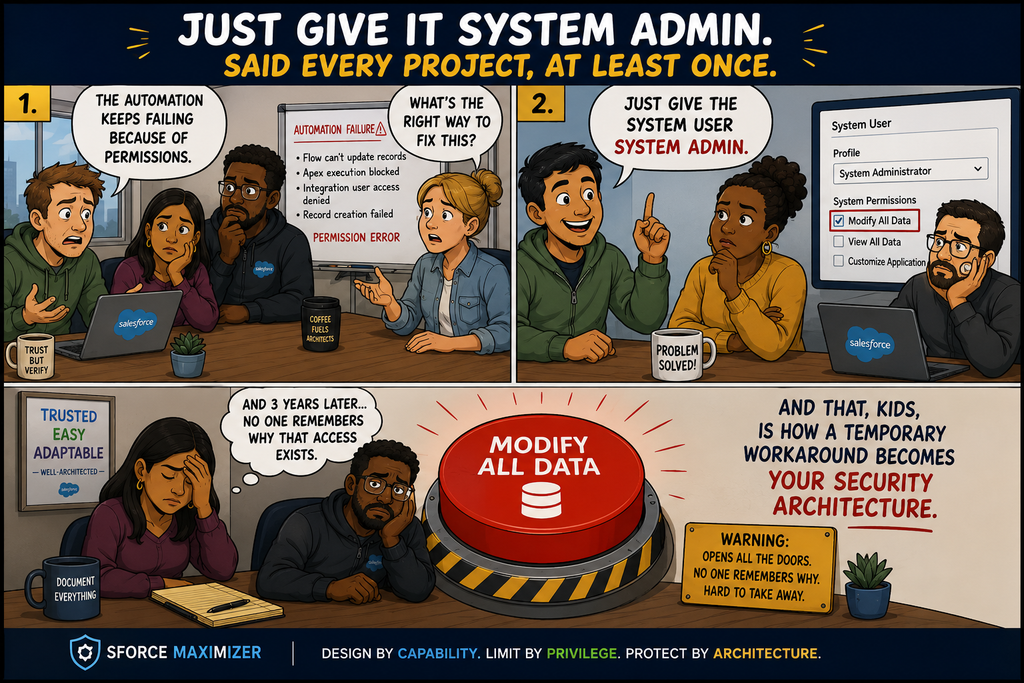
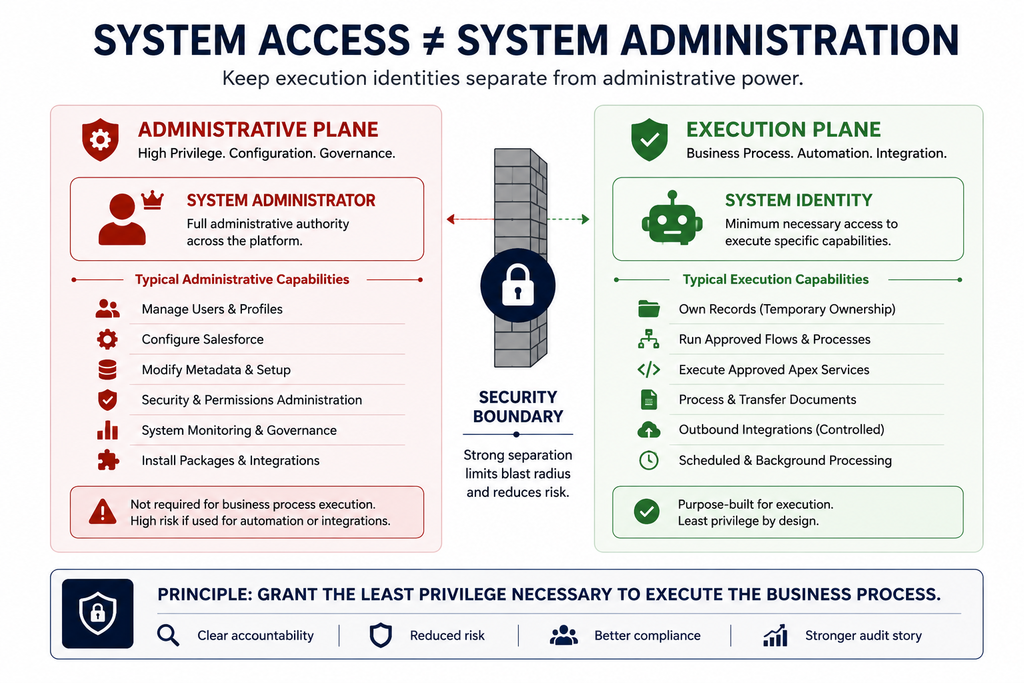
It would work. But it would also mean giving those processes permissions such as View All Data and Modify All Data, along with administrative capabilities that had nothing to do with the actual requirements. In a regulated environment, that becomes more than a theoretical security concern. It becomes an audit question:
Who changed this data? Why did this identity have access to it? And why could it access data outside the business process it was designed to execute?
That led me to a different model for designing Salesforce system access. I think of it as:
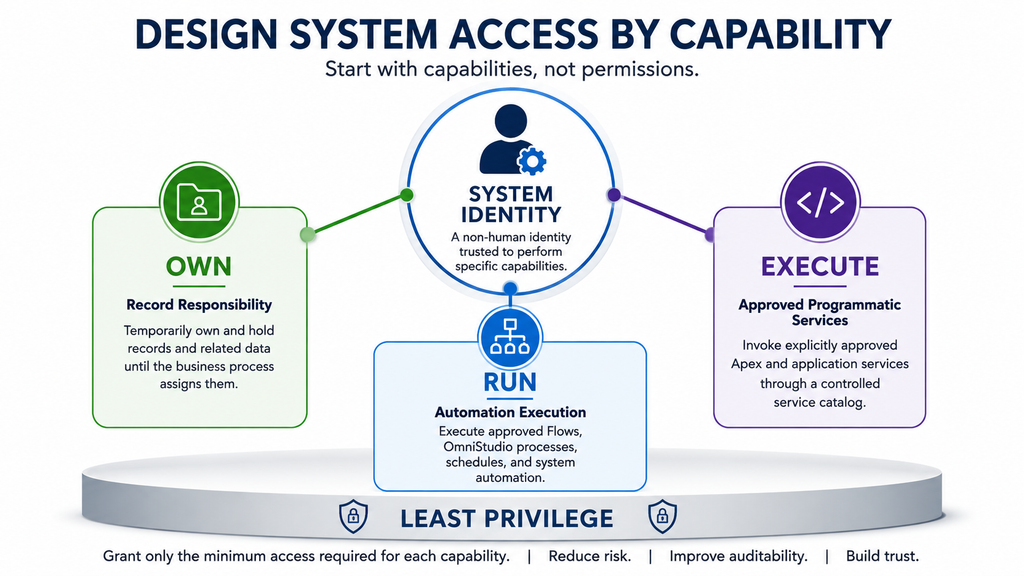
OWN. RUN. EXECUTE.
These are three different capabilities, and they should not automatically translate into one highly privileged Salesforce user.
The Problem With “Just Use the System Administrator”
I’ve seen the System Administrator approach used many times. The reasoning is understandable.A system process needs to operate regardless of normal user restrictions. A System Administrator already has broad access. Using that account avoids permission problems.And initially, everything works.
The problem appears later. I saw this become particularly difficult in an implementation for a global organization where data crossed organizational and geographic boundaries. European records, for example, had their own access controls and compliance requirements. When automated processes executed using an identity with Modify All Data, questions eventually surfaced:
Who changed this record?
Why could this process access this country’s data?
Was this access actually required by the business process?
What began as a convenient technical solution became an audit and compliance problem. The lesson for me was simple:
“The system needs to do it” is not a sufficient justification for unrestricted access.
A system identity can be privileged without becoming a System Administrator.
1. OWN — Record Ownership Is Not Administration
Our first requirement was deceptively simple. A Claim is submitted through an online portal. Salesforce requires an internal owner, but the Claim isn’t ready to be assigned to a Claim Manager yet. Before assignment, the Claim goes through an Checklist processs where we determine whether the necessary information is available. That process could take a month or two.During that period, someone—or something—has to own the Claim and its related records. Our solution was a dedicated System User.
But here’s the important part: That user doesn’t actually do anything to the Claim. It doesn’t edit the Claim. It doesn’t process the Claim.It doesn’t make business decisions. It simply owns it until another process assigns it to the appropriate internal user.That means the security requirement isn’t: “Give the System User powerful Claim permissions.” It’s: “Give this identity enough authority to serve as the temporary owner.” Those are very different requirements.
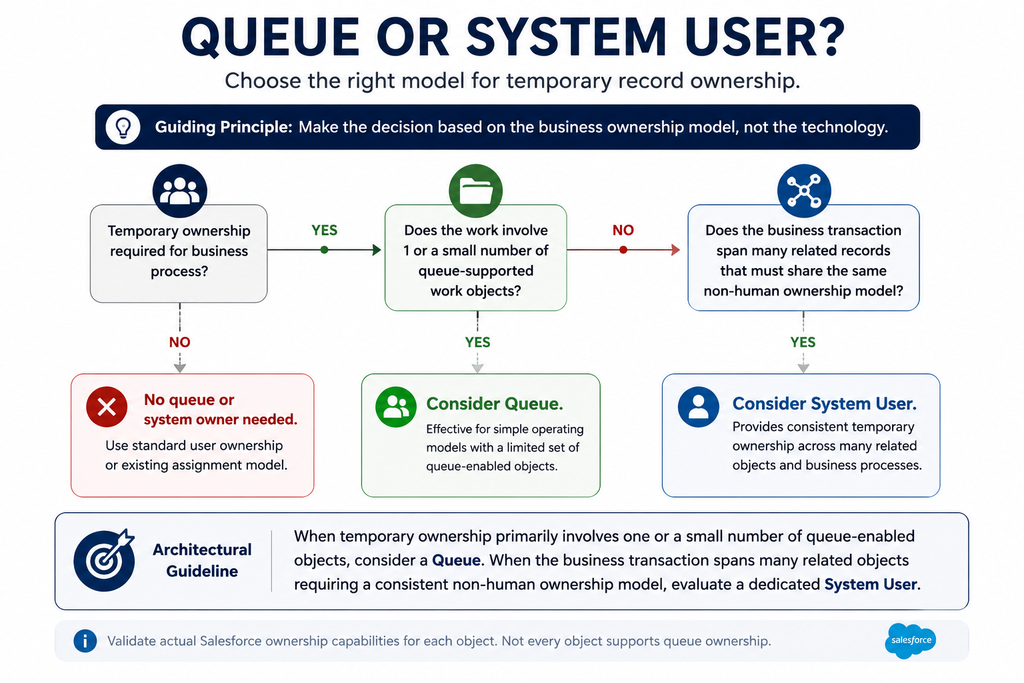
Why Not Use a Queue?
Queues are absolutely worth considering. For a relatively simple operating model—for example, Cases waiting to be assigned to service agents—a Queue can be an excellent temporary parking place. Our situation was different. The Claim was surrounded by approximately ten related objects that needed to participate in the same operating model. Using queues could mean creating and governing multiple queue structures simply to represent temporary ownership across the application. At that point, the Queue wasn’t simplifying the architecture. A dedicated System User provided a consistent temporary ownership model across the related records. That gives me a useful architectural guideline:
When temporary ownership primarily involves one or a small number of queue-enabled objects, consider a Queue. When the business transaction spans many related objects requiring a consistent non-human ownership model, evaluate a dedicated System User.
The decision shouldn’t be “Queue versus User” based on Salesforce features. It should be based on the business ownership model.
2. Separate OWN From ASSIGN
There is another subtle distinction in our Claims example. The System User owns the unassigned Claim. But it doesn’t necessarily need the authority to assign the Claim. Those are separate capabilities. Our assignment process is handled through automation. Business rules determine which type of Claim is involved and which eligible users are available. The process then assigns the Claim to the appropriate internal user.
So the lifecycle looks like this:
Portal Submission → System Owner → In Good Order → Assignment Process → Claim Manager
This distinction matters because it prevents us from granting permissions such as ownership-transfer authority simply because the account happens to be the current owner. Ask two separate questions:
Who needs to OWN the record?
and:
Who or what needs authority to ASSIGN the record?
The answer may not be the same identity.
3. RUN — Execute Automation Without Administering It
The second major capability is automation.
Our implementation has a mixture of:
Screen Flows
record-triggered Flows
scheduled automation
OmniStudio processes
background processing
Apex invoked through automation
Become the user for process flow automation which is a user used to run automation flows if the logged in user context is not clear.
In our case, interactive Screen Flows represent a significant portion of the requirement, with backend automation making up the remainder. The temptation is again to say:
This account runs system processes, so give it system-level access.
But we should separate two ideas:
Running automation is not the same as administering automation.
The identity may need permission to execute approved Flows. That does not mean it should be able to create, modify or administer those Flows. I would therefore create a dedicated capability such as:SYSTEM_Automation_Execution and place the required Flow execution permissions and associated resource access there. The System User can also serve as the Default Workflow User where appropriate. But I consider that an identity configuration decision, not a permission. The distinction is useful:
Identity configuration: Who is designated as the Default Workflow User?
Capability: What automation is this identity trusted to execute?
Permission: What Salesforce permissions and resources are necessary for that automation?
Don’t collapse those into one decision.
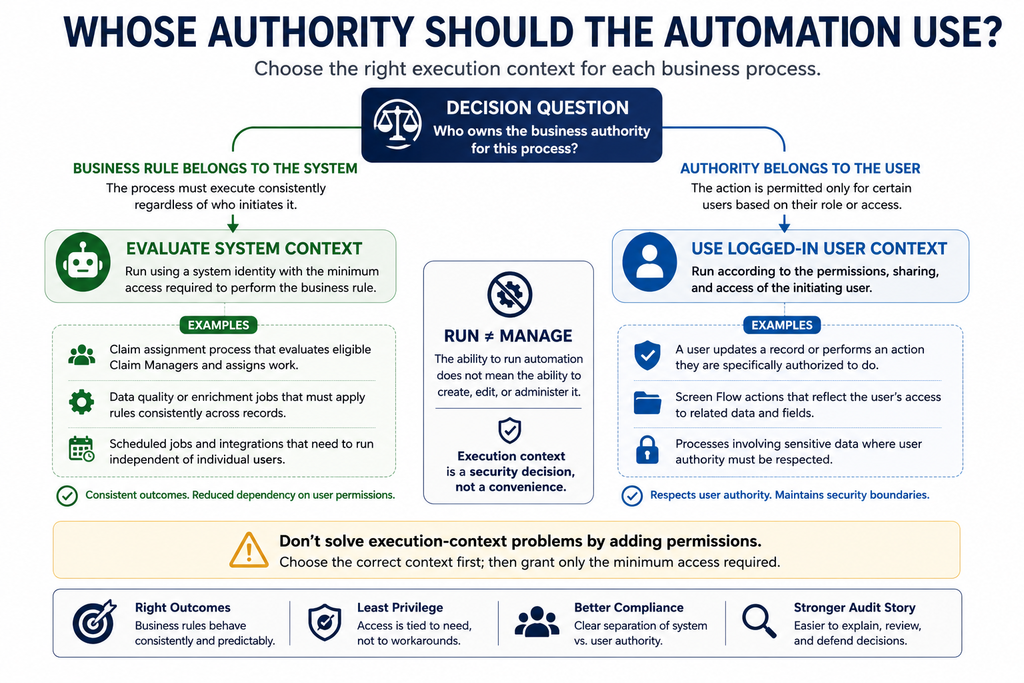
Execution Context Matters More Than We Sometimes Admit
I’ve seen another common pattern. A Flow fails because it cannot access something. Someone gives the user more permissions. It fails again. More permissions are added. Eventually, the automation works. But nobody has really answered the architectural question:
Under what security context should this process execute?
I use a straightforward rule. If there is a clearly defined business rule that the system must perform consistently regardless of the initiating user, then system context may be appropriate. Claim assignment is a good example. The assignment process needs to evaluate eligible Claim Managers and assign work according to defined business rules. The outcome shouldn’t depend on whether User A or User B happened to trigger the process.
But consider another Flow that represents an action only certain business users are authorized to perform.In that scenario, running everything through a privileged System User can defeat the security model. The process should respect the logged-in user’s authority.
My guideline is:
If the business rule belongs to the system, evaluate system context. If the business rule belongs to the user’s authority, respect the logged-in user.
Don’t use system context merely because it makes an automation easier to build.
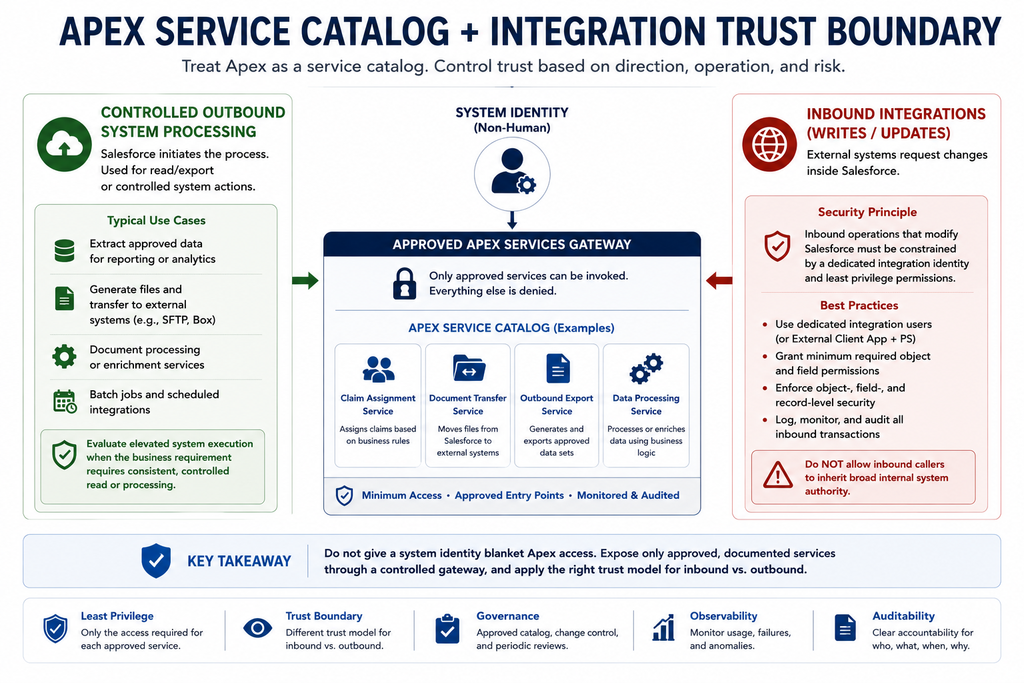
4. EXECUTE — Treat Apex as a Service Catalog
Our third capability is Apex. Again, saying: “The System User needs Apex access” is too broad.
Our Apex use cases include things such as:
assignment processing
batch processing
extracting Salesforce data
generating files
moving data/files to external systems
document-processing services
Apex invoked from Flow
Rather than treating Apex as one giant technical capability, I prefer to think of it as a service catalog. The security question becomes: Which approved application services should this identity be allowed to invoke? Maybe the System User needs:
Claim Assignment Service
Document Transfer Service
Outbound File Generation Service
But that doesn’t mean it needs unrestricted access to every Apex capability in the organization. Treat approved Apex entry points as an allow-list. This also creates a much cleaner governance conversation:
What does this service do?
Why does it require elevated authority?
What data can it access?
Which identity is authorized to invoke it?
5. Inbound and Outbound Integrations Have Different Trust Profiles
This discussion also exposed an important distinction around integrations. Consider an external system making an inbound request to update Salesforce. That system is asking Salesforce to change data. I want the operation constrained by the identity representing that integration and the permissions intentionally assigned to it. I don’t want an external caller to inherit broad internal system authority simply because it is easier. Now consider a controlled outbound process.Salesforce needs to query approved data, generate a file and transfer it to an external destination. If the process is read-oriented and must operate consistently across a defined dataset, elevated system execution may be justified.
That gives me another useful rule:
Treat inbound operations that modify Salesforce as a separate trust boundary. For controlled outbound system processes, evaluate elevated read authority when the business requirement genuinely requires it.
This isn’t a rule that every outbound process deserves system access. It is a reminder to evaluate direction, operation and risk independently. An integration shouldn’t inherit the internal System User’s privileges merely because both processes happen to involve Apex.
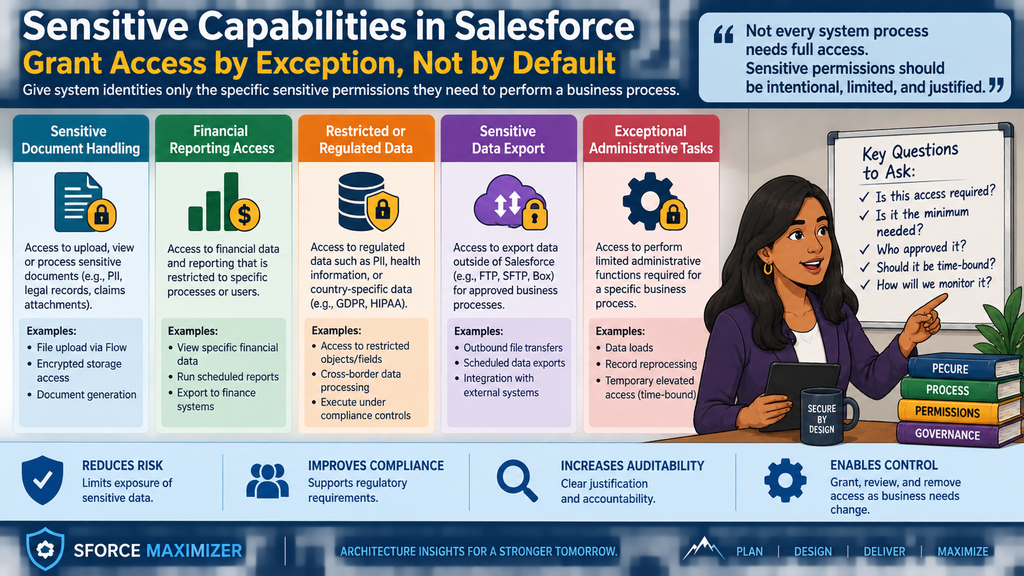
6. Sensitive Capabilities Should Be Granted by Exception
As we worked through the model, another category emerged that doesn’t fit neatly into OWN, RUN or EXECUTE. Some capabilities are sensitive enough that they should be independently assignable. Document handling is a good example.
Documents may contain:
medical information
financial information
personal information
email addresses
phone numbers
government identifiers
other regulated or confidential information
But the architectural principle isn’t really about documents.
It’s about sensitive capabilities.
The same concept could apply to:
access to restricted personal data
financial reporting
sensitive exports
exceptional approvals
regulatory functions
privileged data correction
temporary elevated access
Rather than embedding those permissions into a large persona, create an explicit capability permission set. For example: SYSTEM_Sensitive_Document_Processing or for human users: BUSINESS_Sensitive_Document_Upload The permission set represents something meaningful: This identity has been explicitly trusted to perform this sensitive function.
That makes access much easier to explain during an audit.
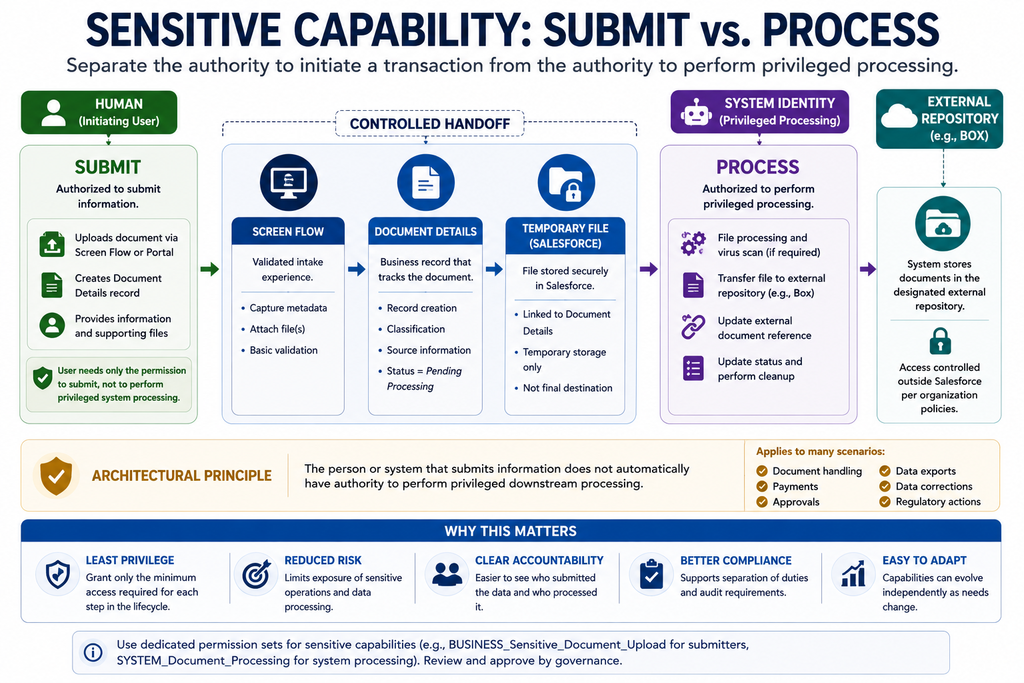
7. Separate SUBMIT From PROCESS
Our document use case illustrates this particularly well. A claimant may upload a document through an external portal. An internal Claims user may receive a document through email or scanning and upload it through a Screen Flow. Those users need the ability to submit the document. They don’t necessarily need permission to perform everything that happens afterward.
Our lifecycle is closer to: Human → Upload → Document Details → Temporary Salesforce File → System Processing → Box or AWS. The human owns the submission. The system owns the processing. For example, the human may create the Document Details record and upload the file.
The system can then:
process the file
transfer it from Salesforce to external storage such as Box
update processing status
update the external document reference
perform appropriate cleanup
This gives us another reusable security principle:
Separate permission to initiate a transaction from permission to perform privileged downstream processing.
This principle applies well beyond documents. Think about: Submit payment → Process payment
Request approval → Approve
Request export → Generate sensitive export
Submit data correction → Execute privileged correction
The person initiating the business transaction doesn’t automatically need the authority required to complete the system operation behind it.
Visual concept: Left side HUMAN — SUBMIT. Right side SYSTEM — PROCESS. Between them a controlled handoff. Use Document Upload → Temporary Storage → Box as primary example, with smaller icons representing payment, approval and data correction.
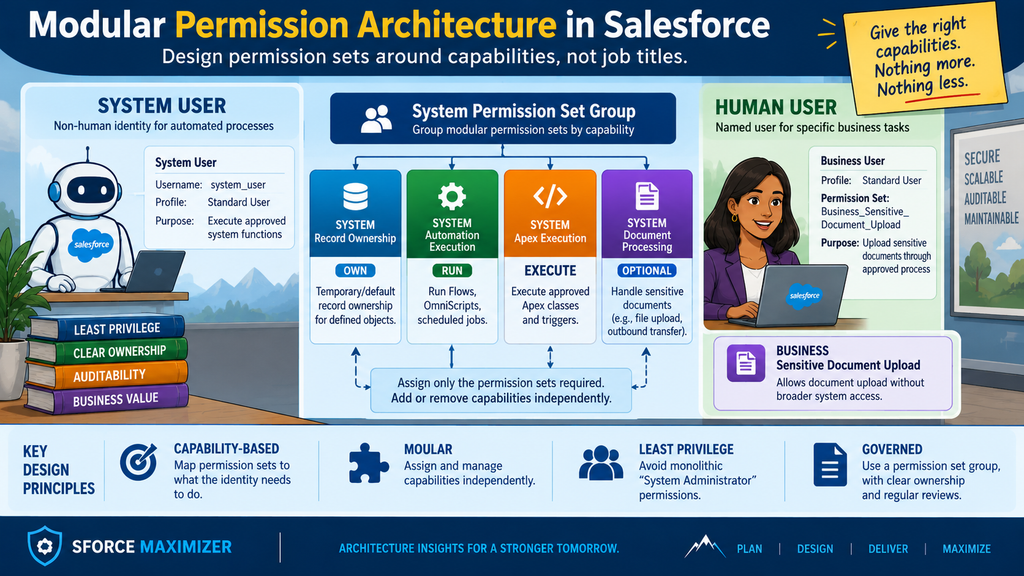
8. Build Permission Sets Around Capabilities
This leads to the permission architecture I prefer. Don’t start with one permission set called: System User Permissions and continue adding privileges to it for the next five years.
Create modular capabilities.
For example:
Permission Set
Purpose
SYSTEM_Record_Ownership
Temporary/non-human ownership
SYSTEM_Automation_Execution
Approved Flow/Omni/system automation
SYSTEM_Apex_Execution
Approved Apex service entry points
SYSTEM_Document_Processing
Privileged downstream document processing
BUSINESS_Sensitive_Document_Upload
Approved human document-submission capability
For the System User, I would group the appropriate system capabilities into a Permission Set Group.
Conceptually:
System User → System Permission Set Group → OWN + RUN + EXECUTE + approved optional capabilities
I prefer this over one monolithic permission set for two reasons. First, it supports least privilege. If another identity eventually needs RUN but not OWN, we can assign only the automation capability. Second, it improves auditability. When an auditor asks why an identity has access, the permission-set assignment itself starts explaining the architecture. That is much more useful than discovering that the account has a permission because someone added it three years ago when a Flow failed.
9. Governance Matters as Much as Permission Design
Modular permission sets don’t automatically create good security. They need governance. In our model, creating a new privileged capability should not simply be an administrator deciding that another permission set would be convenient. There should be an intentional review process.Depending on the organization, that could involve:
Salesforce Administration → Architecture/Center of Excellence → IT Leadership → Information Security
The level of review should reflect the sensitivity of the capability. This becomes especially important for permission sets involving sensitive information, broad data access, system execution or external integrations. The question during review shouldn’t simply be: “Are these Salesforce permissions correct?” It should be: “Why does this capability exist, who should have it, what resources does it expose, and what happens if it is misused?” That moves permission-set governance from Salesforce configuration into enterprise security architecture.
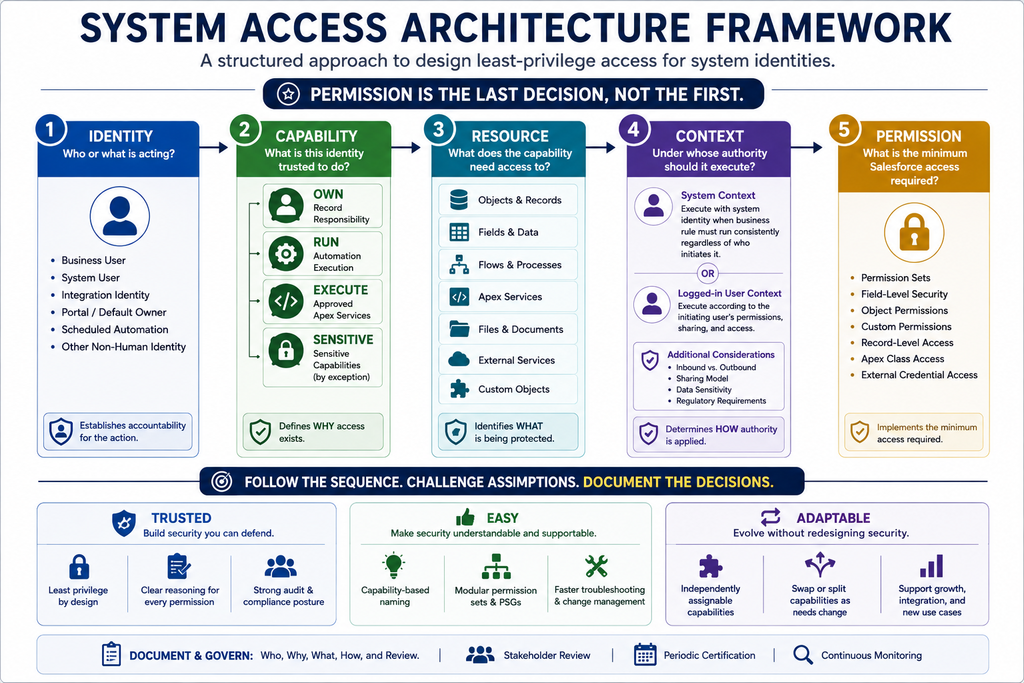
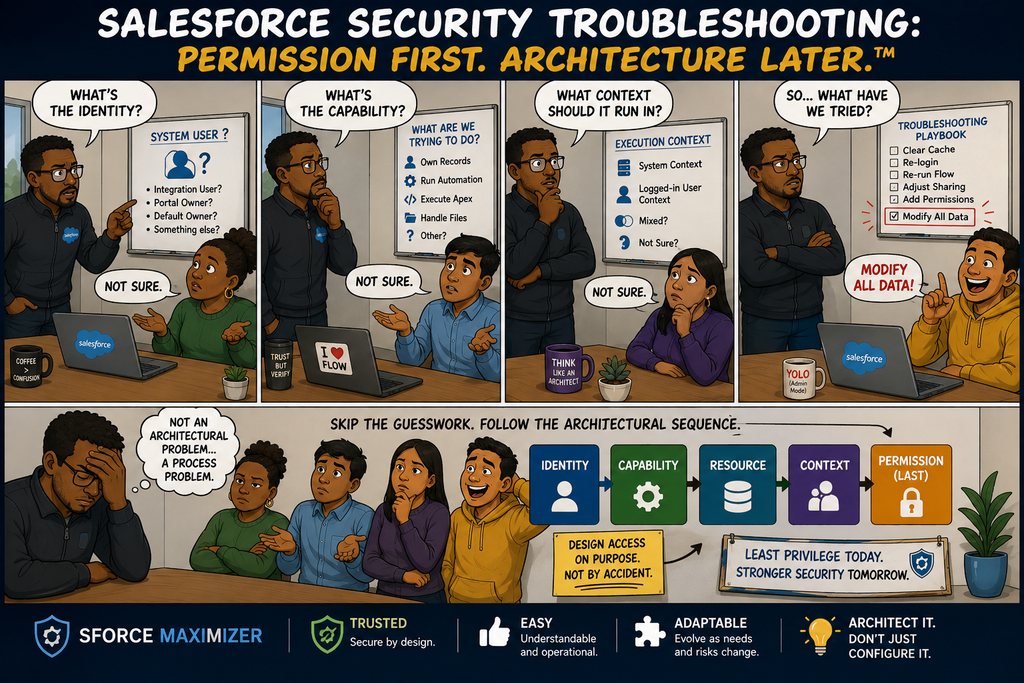
10. The Four-Layer System Access Model
All of this led me to a framework I think is useful beyond this particular Claims implementation. When designing system access, work through four layers before selecting Salesforce permissions.
Layer 1 — IDENTITY
Who or what is acting? Is it:
a business user?
a System User?
an integration identity?
a portal/default owner?
a scheduled automation identity?
Identity tells us who is accountable for the action.
Layer 2 — CAPABILITY
What is this identity trusted to do?
For our System User: OWN –> RUN –>EXECUTE And, where justified, additional sensitive capabilities. Capability tells us why access exists.
Layer 3 — RESOURCE
What does the capability actually need access to?
That might include:
objects
fields
records
Flows
Apex services
Files
custom objects
external services
Resource tells us what is being protected.
Layer 4 — EXECUTION CONTEXT
Under whose authority does the operation execute?
Should it respect the logged-in user? Does the business process genuinely require system context? Should sharing be respected? Is this an inbound external request or an internally controlled system process? Context tells us how the authority is applied. Only after answering those questions should we determine the Salesforce permissions required.
I also like evaluating this architecture through Salesforce’s Trusted, Easy and Adaptable principles.
Trusted
Every elevated privilege should have an explanation. Instead of saying: “It’s there because this is our System User.” we should be able to say: “This permission exists because this identity performs this approved capability.” That creates a much stronger least-privilege and audit story.
Easy
Security architecture needs to be understandable by people who didn’t design it. An administrator should be able to look at: SYSTEM_Record_Ownership or SYSTEM_Automation_Execution and immediately understand why that permission set exists. Good naming and capability decomposition make troubleshooting easier because we can start with: What capability is failing? instead of: What random permission is missing?
Adaptable
Today, OWN, RUN and EXECUTE may all belong to the same System User. Tomorrow: OWN might move somewhere else. RUN could be separated into another automation identity. EXECUTE might be split between internal services and dedicated integration identities.A modular security architecture allows those changes without redesigning the entire permission model. That’s the real value of capability-based security.
The Architect’s Takeaway
Here are 3 key takeaways for you when you design the system user permission
Start with a requirement framework on what the system should own, run and execute.
Layer on top of it an identity, capability,resource, context and permission framework to design your permissionsets.
Avoid monolithic profiles and permissionsets which can cause problems for audit, compliance and future security issues.
As always, you are welcome to post your comments or email me at buyan@eigenx.com for further questions.
Hi there!
My name is Buyan Thyagarajan. I am a Salesforce consultant specializing in Higher Education, Manufacturing and Marketing Automation. My blogs will help you to maximize your Salesforce CRM investments, prevent problems beforehand and make the right decisions. If you need to talk to me right away, you can email me at buyan47@gmail.com or call me at 302-438-4097