(Ready to publish)
If you are an architect implementing an Industry Cloud like Public Sector Solutions with a requirement
to track household members as part of claim or benefit management, this post is for you. On the
surface, the PSS household model looks straightforward — a Party Relationship Group, some party
roles, and you’re done. What actually causes complexity is a pair of deceptively simple questions:
when do you use Account-to-Account Relationship versus Account-to-Contact Relationship, and where
exactly do roles live? The answer to those two questions determines whether your data model is clean
or a tangled mess that takes three sprints to untangle.
Know Your Five Objects — Especially the One That Misleads You
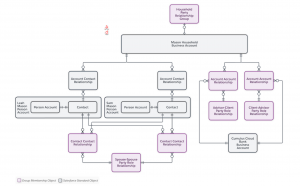
The first instinct most Salesforce architects have is to use Account-to-Account Relationship to
connect family members to a household — because Person Accounts are accounts, after all. That
instinct is wrong. The household model is built with contacts in mind, which means each
Person Account exposes a Contact record underneath, and the correct binding is always
Account Contact Relationship. Account-to-Account Relationship is reserved strictly
for external organizational connections: an employer, a law firm, or an insurance provider. The
second object architects underestimate is the Party Relationship Group itself. It is not a rich
data container — it is a container that points to a Business Account record type. The roles that
define each individual’s position in the household (primary claimant, victim, dependent) live on
the Account Contact Relationship record, not on the Party Relationship Group.
| Object | Use It For | Common Mistake |
|---|---|---|
| Party Relationship Group | Defining the household as a group type; ties to the Business Account | Expecting it to hold member data — it’s a container, not a record hub |
| Account Contact Relationship | Binding every Person Account (family member) to the Household Account; defines their role | Using Account-Account Relationship for this instead |
| Party Role Relationship | Defining named person-to-person pairs: Husband–Wife, Father–Son, etc. | Forgetting to create the inverse record for every pair |
| Account Account Relationship | Employer, law firm, insurance connections to the household | Using it for family member connections |
| Person Account | Each individual family member — simultaneously an Account and a Contact | Not enabling Person Accounts before any PSS configuration begins |
The Automation Reality: 8–12 Records for a Family of Four
Here is the number that should reframe every conversation you have about this model in sprint
planning: a household with four members — a husband, wife, son, and daughter — requires a
minimum of 8 to 12 records spread across Party Relationship Group, Party Role
Relationships and Account Contact Relationships. That is before you factor in inverse relationship
No average user can create this manually and get it right consistently. Salesforce provides
a New Group Guided Flow that handles the creation pass cleanly — it is the right tool
for initial household setup. The problem is post-creation: editing a relationship or removing a
member from an existing household cannot be done through the flow. You have to go record-by-record.
The architectural takeaway is clear — plan for a custom automation layer that handles creation,
editing, and removal across all five objects. Do not assume Salesforce handles this out of the box,
because it does not.
| 8–12 | Records required for a 4-member household Party Relationship Group + Party Role Relationships (with inverses) + Account Contact Relationships. Plan your automation strategy before your first sprint — this is not a user data entry task. |
The Gaps the Documentation Won’t Warn You About
Beyond the automation requirement, there are three architectural gaps that surfaced in my POC that
deserve explicit attention. First, the standard model has no active flag or end date on relationship
For a public sector use case where benefits eligibility depends on who was part of a
household at a specific point in time, this is a real audit and compliance gap — you will need to
build that lifecycle management custom. Second, the role of victim within a household is
critical in claim and benefit scenarios: it is the role that proves eligibility for a specific
benefit, and it needs to be explicitly modeled in the Account Contact Relationship roles picklist,
not assumed. Third, for large or complex households, users need a visual layer to understand the
relationship graph. Actionable Relationship Center (ARC) is the natural candidate, but it is not
functional for this use case at the moment. Plan for a custom LWC to visualize household
relationships if your implementation involves anything beyond a simple nuclear family structure.
| 🔮 | Three Gaps to Build Around 1. No active flag or end date on relationships — build lifecycle management custom. 2. Victim or beneficiary role must be explicitly configured — it is not assumed by the model. 3. ARC does not currently work for this use case — plan for a custom LWC visualization. |
The Architect’s Verdict: Production-Ready With One-Time Setup
The single most important thing you can do before touching any configuration is to
identify and document all relationships upfront during requirements gathering.
The PSS household model has a significant one-time setup cost: metadata records for every
relationship pair, security configuration, permission sets for Public Sector and Groups, a
Household Record Type on Account, and role picklist values for every scenario in your use case
covers. That setup is real work — but it is finite. Once it is done and documented, the model
Is production-ready. The platform handles the structural heavy lifting; your job as an architect
is to design the automation layer on top and close the three gaps above. Going in with eyes open
about what Salesforce provides out of the box versus what you need to build custom is the
difference between a clean implementation and one that accumulates technical debt from day one.
🏛️ Architect Pre-Build Checklist — PSS Household Model
- Document complete relationship matrix during requirements — all pairs and edge cases (victim, guardian, sibling)
- Enable Person Accounts before any PSS configuration begins (irreversible — confirm with org owner)
- Assign Public Sector and Groups permission sets to all relevant users
- Create Household Record Type on Account with appropriate page layout
- Configure Account Contact Relationship Roles picklist — include victim, dependent, and any PSS-specific roles
- Create all Party Role Relationship pairs with inverses before running the Guided Flow
- Plan and scope custom automation for household creation, editing, and member removal
- Design active flag and end-date fields on relationship records for audit and eligibility tracking
- Confirm ARC status for your release — plan custom LWC if visualization is a requirement
- Document all one-time metadata configuration so future admins can maintain it
| 📸 | POC Screenshot — James Doe Household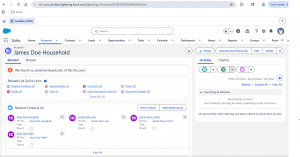 The household Business Account showing four Related Contacts: Jane Doe-Wife, Jane Doe-Daughter, James Doe-Son, and James Doe-Victim. Each is a Person Account bound via Account Contact Relationship. Note the “View Account Hierarchy” button — confirmation that the Account structure is intact. |
Limitations if you use person accounts (Be ready to for custom LWC)
If you are using person accounts in your organization and need to capture family members as related records, you may encounter challenges. Person accounts focus on contacts, so custom fields for family members are stored in the Account Contact Relationship object.
The key issue is that Salesforce doesn’t display the Business-to-Contact relationship related list on the person account detail page, which can confuse users. Currently, this information is only accessible on the party relationship page, leading to a subpar user experience.
To summarize, if you plan to use the PSS household model, here are three things for you to consider.
- If you use person accounts for individual data, plan for custom build to display related family members to avoid user experience issues.
- The data model scales well for Business to business relationships but plan for automation to, populate the records in party role relationships.
- Leverage inverse relationships between family members to create the inverse records which can help avoiding orphan records.
Feel free to email me your thoughts or you can email me at buyan@eigenx.com