Trailblazer Community Inspiration: This article was inspired by a recent Salesforce Trailblazer Community discussion on Page Layouts vs. Dynamic Forms. Rather than summarizing the responses, I’d like to explore the broader architectural decision that many administrators and architects face during Salesforce modernization projects. ( Next step, break the image into 5 images , embed them and update the content for publishing it)
A Simple Configuration Question That Exposes a Bigger Architecture Decision
One of the most common projects I see today is a Salesforce security redesign. Legacy organizations often contain numerous Profiles, a handful of Permission Sets, multiple Page Layouts, and Record Types that have accumulated over years of enhancements. As Salesforce continues encouraging organizations to reduce dependency on Profiles and adopt Permission Sets, many teams naturally begin asking, “Should we replace our Page Layouts with Dynamic Forms?”
To me, that is the wrong place to start. Too often we approach Salesforce modernization as a feature replacement exercise—replacing one component with another simply because it is newer. Instead, the conversation should begin with the business. What information should every user have access to? What information is relevant only to specific users? Which business processes require a different experience? Once those questions are answered, the Salesforce solution usually becomes much clearer.
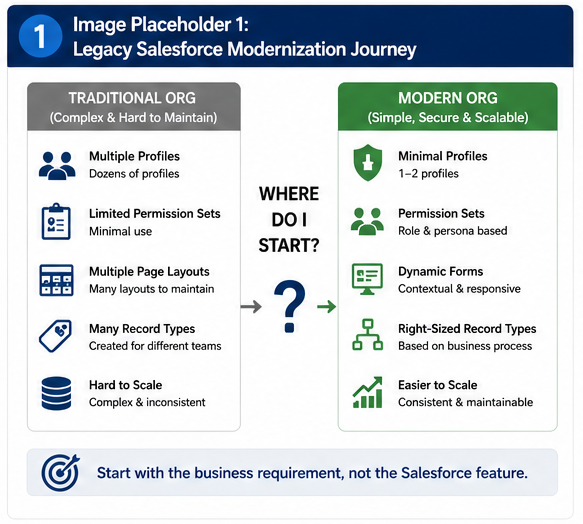
Start with the Requirement, Not the Salesforce Feature
When a business user tells me, “Our sales team needs five new fields,” I don’t immediately think about Dynamic Forms or Page Layouts. My first questions are always business questions.
Who should have access to these fields? Should everyone see them, or only specific users? Are these fields supporting a unique business process, or are they simply improving the user experience? Those answers determine the architecture—not the Salesforce feature itself.
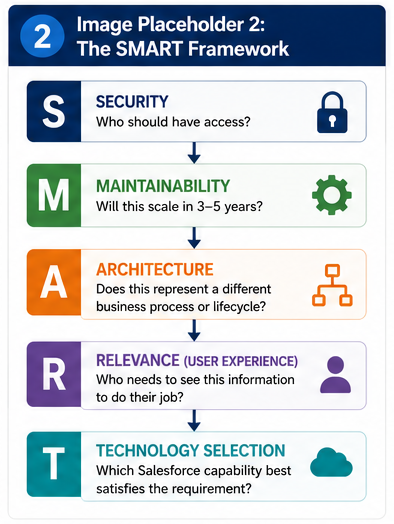
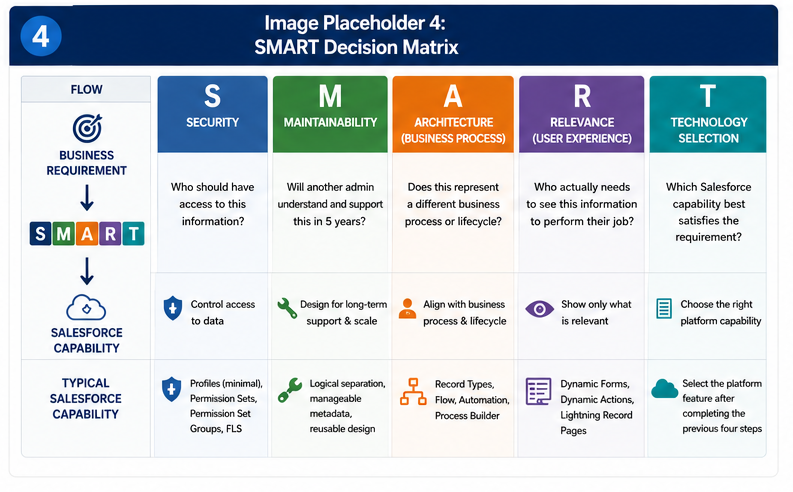
Over time, I’ve found myself following the same decision process on nearly every implementation. I start with Security, then evaluate Maintainability, determine whether the requirement supports a different Architecture or Business Process, consider the Relevance of the information for the end user, and only then select the appropriate Salesforce Technology. I call this the SMART Framework.
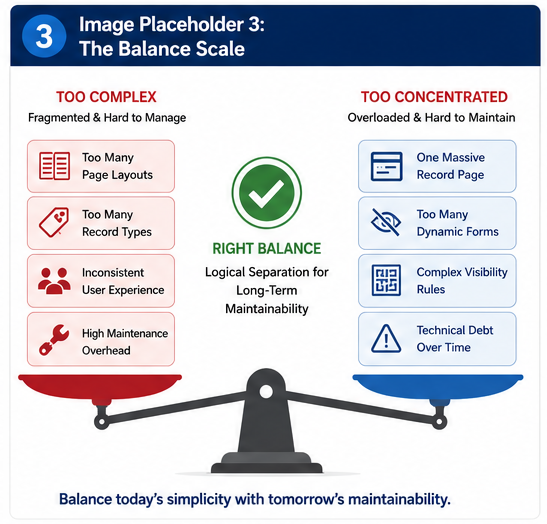
Good Architecture Is About Balance, Not Consolidation
One recommendation I hear frequently is, “Let’s build one Lightning Record Page and use Dynamic Forms for everything.” While that sounds appealing on day one, I rarely evaluate a design based on today’s requirements. I evaluate it based on where the organization will be three to five years from now.
As new fields, automation, and business requirements are introduced, a single Lightning Record Page can become increasingly difficult to maintain. Likewise, a Page Layout containing more than fifty fields often leads to excessive scrolling and a poor user experience. Dynamic Forms solve many usability challenges, but they can also introduce technical debt when pages become overloaded with visibility rules and conditional logic. Rather than forcing every requirement into one page, I prefer logical separation that keeps both the administrator experience and the end-user experience manageable over time.
The SMART Decision Guide
One of the biggest mindset shifts for Salesforce architects is realizing that there is rarely a single feature that solves every problem. Dynamic Forms don’t replace Record Types. Permission Sets don’t replace business process. Page Layouts haven’t disappeared. Every capability still has a role when it is mapped to the right business requirement.
Before making any configuration decision, I encourage administrators and architects to pause and apply the SMART Framework.
| SMART | Question to Ask | Typical Salesforce Capability |
|---|---|---|
| S – Security | Who should have access to this information? | Profiles (minimal), Permission Sets, Permission Set Groups, Field-Level Security |
| M – Maintainability | Will another administrator understand and support this solution in five years? | Logical separation, manageable metadata, reusable design |
| A – Architecture | Does this represent a different business process or lifecycle? | Record Types, Flow, Automation |
| R – Relevance | Who actually needs to see this information to perform their job? | Dynamic Forms, Dynamic Actions, Lightning Record Pages |
| T – Technology | Which Salesforce capability best satisfies the requirement? | Select the platform feature only after completing the previous four steps |
Final Thoughts
Modern Salesforce architecture isn’t about replacing one feature with another—it is about assigning the right responsibility to each platform capability. When security requirements are solved by security features, user experience by user experience features, business process by process features, and every decision is validated for long-term maintainability, the platform becomes easier to scale, easier to support, and easier to evolve.
The next time someone asks, “Should I use Dynamic Forms or Page Layouts?”, don’t start with Salesforce. Think SMART first. The technology decision is usually the easiest part once the business requirement has been clearly defined.
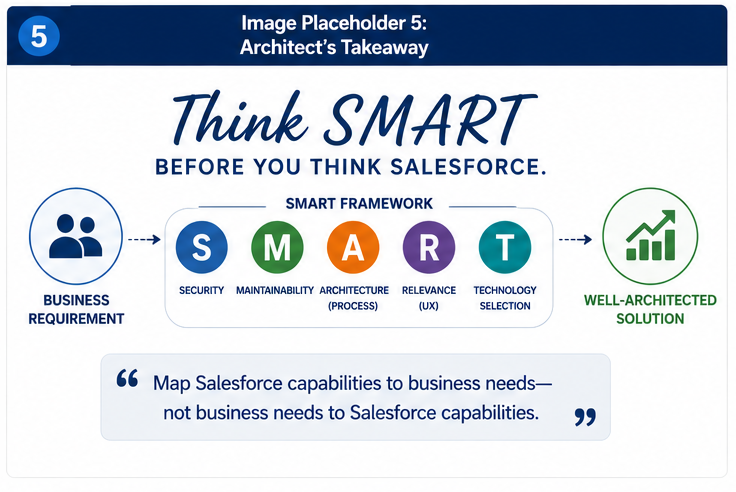
To summarize, here are 3 key take aways for you.
- Before overhauling security and deciding any salesforce security component, always ask the business question. (Who needs access, is there a process impact, who should not see )
- One size fits all does not work all the time and use field count as a guide for logical separation
- Record types still makes sense for business process which can reduce cost of ownership.
As always , you are welcome to email me at buyan@eigenx.com for any questions.