A recent community discussion asked a familiar question: Should every Salesforce integration have its own Profile, or should architects rely on Permission Sets and Permission Set Groups? The responses reflected current Salesforce best practices—keep profiles minimal, extend access through permission sets, and create additional profiles only for specific scenarios, such as IP restrictions. While those recommendations are technically sound, I believe the community is asking the wrong question.
As enterprise architects, our responsibility is not simply deciding how to grant permissions. Our responsibility is to decide what an external system should ever be trusted to do within Salesforce. Profiles, Permission Sets, Connected Apps, and Permission Set Groups are implementation details. The real architectural decision is designing a security model that can support dozens—or eventually hundreds—of integrations while remaining secure, auditable, and adaptable.
This is the framework I use when designing enterprise integrations.
Section 1 – Trust Begins Before Authentication
Every new integration introduces a new trust boundary into your Salesforce ecosystem. Before creating an integration user, assigning a profile, or configuring a Connected App, I begin with discovery.
The first question I ask is simple: What data does this system actually need, and why? Every object requiring write access triggers additional discussions around system ownership, reconciliation, and operational responsibility. If Salesforce is the system of record, I expect the external system to reference Salesforce Record IDs for reconciliation. If the external application owns the data, its unique identifier should be stored in Salesforce so both systems can recover from synchronization issues.
I also challenge teams to think beyond successful integrations. What happens when bad data is inserted? How will duplicates be prevented? What is the rollback strategy if thousands of incorrect records are created? These questions are rarely asked during implementation but become critical once systems move into production.
Trust also extends beyond authentication. If an external application requires access to personally identifiable information (PII), I want to understand how that system classifies, protects, and governs sensitive data. My goal is always to minimize the movement of sensitive information outside Salesforce whenever possible.
The lesson is simple: authentication proves who the system is; discovery determines what the system should ever be trusted to do.

Section 2 – Least Privilege Is an Architectural Discipline
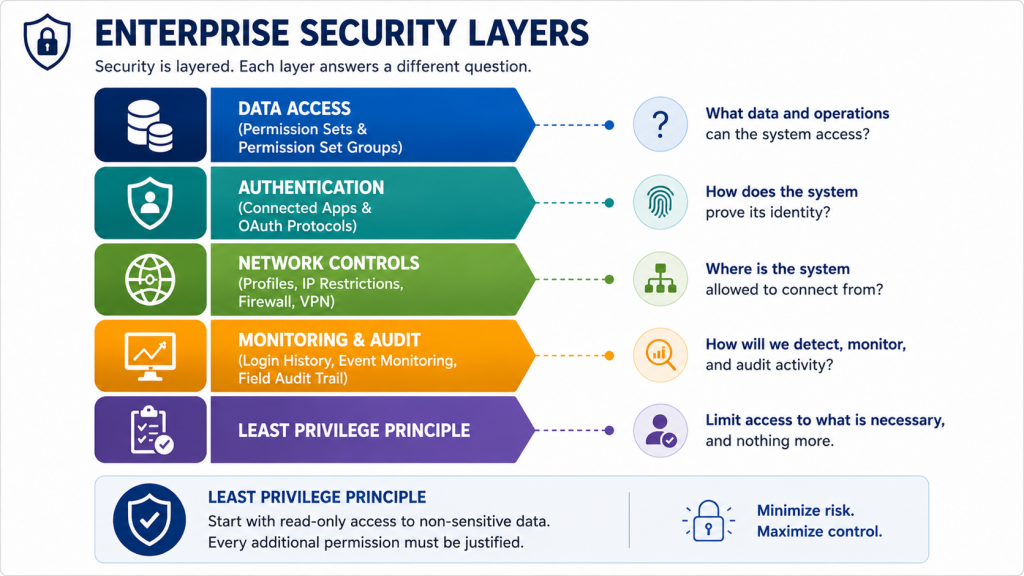
Least privilege is often described as a Salesforce security best practice. I view it differently—it’s an architectural discipline that starts with a single assumption: every integration begins with read-only access to non-sensitive data.
Every additional permission should require a business justification, not technical convenience.
Rather than thinking about Profiles and Permission Sets as Salesforce features, I think about them as layers of responsibility. Data access is controlled through Permission Sets and Permission Set Groups. Authentication belongs to Connected Apps and OAuth protocols. Network restrictions such as IP ranges remain within Profiles or supporting security controls. Each layer answers a different security question without overlapping responsibilities.
I also avoid designing permission sets one object at a time. Instead, I classify data into reusable categories:
- Master Data – Core business entities such as Accounts, Contacts, Products, or Claims.
- Transaction Data – Operational records created throughout the business process.
- Reference or Independent Data – Read-only lookup information shared across multiple systems.
This allows Permission Set Groups to represent business capabilities rather than individual objects, making the security model easier to understand and maintain.
One of the biggest mistakes I continue to encounter is granting Modify All Data or View All Data simply to accelerate implementation. I’ve also seen organizations share a single integration account across multiple systems to reduce licensing costs. Both approaches eventually lead to data quality issues, duplicate records, operational confusion, and costly recovery efforts.
My recommendation is straightforward: start with a reusable minimum-access permission model and expand only when a business capability justifies additional access.
Section 3 – Design Security You Can Defend
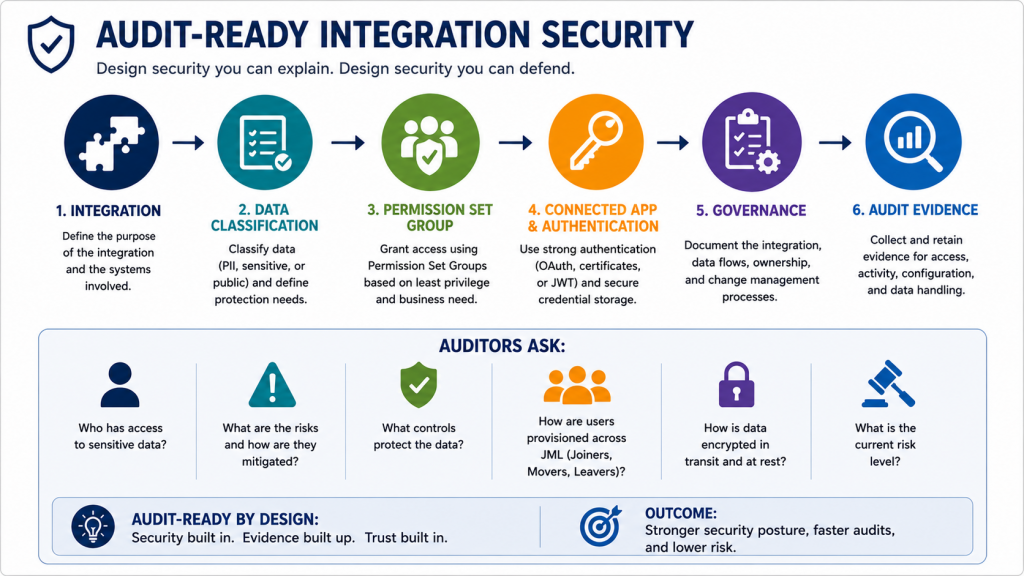
Many organizations don’t invest in auditability until they experience an audit finding, regulatory review, or security incident. By then, they’re redesigning their security model under pressure instead of building it deliberately.
In highly regulated industries such as government and healthcare, auditors focus on understanding who can access sensitive data, how risks are mitigated, and whether appropriate governance controls exist. Concepts like Resource Access Control Matrices (RACM), user provisioning, and Joiners, Movers, and Leavers (JML) processes become central to demonstrating compliance.
When an external system requires access to sensitive information such as Social Security Numbers, I don’t just review Salesforce permissions. I also ask how the receiving application classifies sensitive data, what encryption controls exist, whether authentication protocols meet enterprise standards, and whether network restrictions limit where the integration can connect from.
A well-designed security model allows these questions to be answered quickly because permissions are organized around business capabilities instead of scattered across cloned profiles and shared integration accounts.
The cost of ignoring auditability is rarely limited to compliance penalties. Organizations often spend months rebuilding security models, paying external consultants, and implementing corrective actions that could have been avoided through thoughtful architecture.
Section 4 – Build for Change, Not Today’s Integration
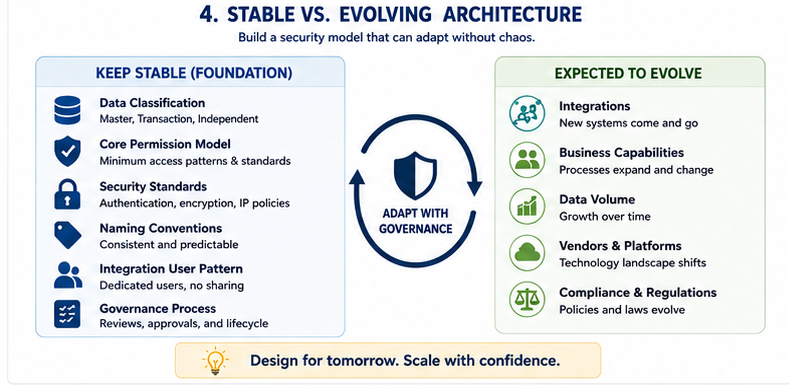
Enterprise integration landscapes rarely stay static. New systems are introduced, existing applications are replaced, compliance regulations evolve, and data volumes continue to grow.
For that reason, I intentionally separate what should remain stable from what is expected to change.
Data classifications, core permission models, and security standards should remain consistent for years. Individual integrations should evolve within those established guardrails rather than introducing entirely new security patterns every time a new application connects to Salesforce.
I’ve seen Salesforce environments supporting twenty or more enterprise applications where security gradually evolved into hundreds of Permission Sets with little governance. Instead, I prefer establishing a reusable minimum-access permission model and expanding only as business requirements justify additional capabilities.
A scalable architecture isn’t measured by how well it supports today’s ten integrations. It’s measured by how confidently it can support the next hundred.
Looking Ahead – AI Agents Will Follow the Same Principles
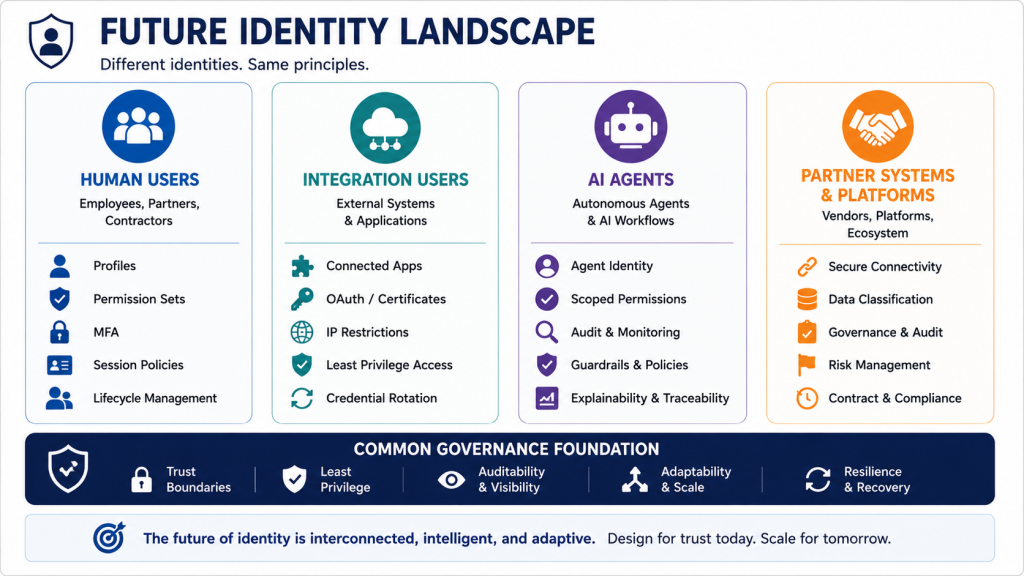
Although AI agents deserve their own discussion, the same architectural principles will continue to apply.
Whether the identity belongs to an ERP system, an external application, or an autonomous AI agent, architects will still need to answer the same questions:
- Can this system be trusted?
- What is the minimum data it requires?
- Can its access be audited?
- Can the organization recover if something goes wrong?
Technology will evolve. Trust boundaries won’t.
Enterprise Integration Security Framework
| Architecture Principle | Key Question |
|---|---|
| Trust Boundary | What should this system be trusted to do? |
| Data Classification | Does it require sensitive information? |
| System of Record | Who owns the data? |
| Least Privilege | What is the minimum access required? |
| Authentication | How will identity be verified? |
| Auditability | Can we explain and defend every permission? |
| Adaptability | Will this model still work after dozens of new integrations? |
| Recovery | What is the rollback strategy if the integration fails? |
Architect’s Takeaway
The original community discussion asked whether architects should use Profiles or Permission Set Groups for integration users. I think the better question is:
Have you clearly defined the trust boundary before granting the first permission?
When architects begin with trust, data ownership, least privilege, and auditability, the implementation decisions become much easier. Profiles, Permission Sets, Connected Apps, and Permission Set Groups are simply tools. The real architecture lies in deliberately deciding what every external system should be trusted to do—and being able to defend that decision years later. Please feel free to email me at buyan@eigenx.com for further questions.