If you’re managing Salesforce integrations for federal agencies or state governments, you’ve likely encountered a familiar frustration: Connected Apps weren’t built with compliance-first organizations in mind. External Client Apps (ECAs) from the latest spring 26 feature represent a fundamental rearchitecting of how Salesforce handles external integrations, with security, compliance, and governance built in from the ground up.
In this post, you’ll learn:
- Why Connected Apps create compliance nightmares for federal agencies
- How External Client Apps provide auditable, version-controlled integration security
- The Well-Architected Framework comparison (ECAs score 56/60 vs. CAs’ 38/60)
- Real-world use cases from federal and global deployments
- Architecture patterns for single-org and multi-org government deployments
Key Takeaway: For organizations with ATO requirements, ECAs aren’t just better—they’re essential.
1. The Problem with Connected Apps
The Challenge: Connected Apps in Regulated Environments
If you’re managing Salesforce integrations for federal agencies or state governments, you’ve likely encountered a familiar frustration: Connected Apps weren’t built with compliance-first organizations in mind.
For over a decade, Connected Apps have been Salesforce’s standard approach for external integrations. They work—but as integration requirements have evolved, particularly around security, compliance, and multi-org deployments—critical architectural limitations have emerged.
The Monolithic Metadata Problem
Here’s the core issue: Connected Apps are a single, monolithic metadata type with no built-in change tracking.
In a typical enterprise, this might be manageable. But in the federal government space, where I work extensively with Public Sector Solutions clients, this creates a compliance nightmare.
The Real-World Impact:
I recently worked with a federal agency managing multiple Salesforce orgs. Every time they made a change to their Connected App configuration—adjusting session timeouts, modifying OAuth policies, updating IP restrictions—they had to:
- Manually document the change in external spreadsheets
- Track who made the change through Setup Audit Trail searches
- Justify the change for ATO (Authorization to Operate) compliance
- Recreate the change history from org backups during audits
This process consumed dozens of hours per quarter. During one compliance audit, the team spent three full weeks reconstructing the change history for their integration configurations. The auditors needed to understand:
- What session-level policies were changed and when?
- Who authorized OAuth scope modifications?
- Why were IP restrictions updated?
- What was the security justification for each change?
With Connected Apps, there’s no version control. No metadata tracking. No clear audit trail.
For organizations with rigid ATO processes—where every configuration change must be documented, justified, and traceable—this is untenable.
The “Global Availability” Security Risk
Beyond compliance tracking, Connected Apps have a fundamental architectural security flaw that most organizations don’t realize until it’s too late.
Here’s what happens: When you create a Connected App in any Salesforce org, the Consumer Key (Client ID) and Consumer Secret are registered globally with Salesforce’s authentication service.
This means those credentials can potentially be used to initiate OAuth flows against any Salesforce org—not just the one where you created them.
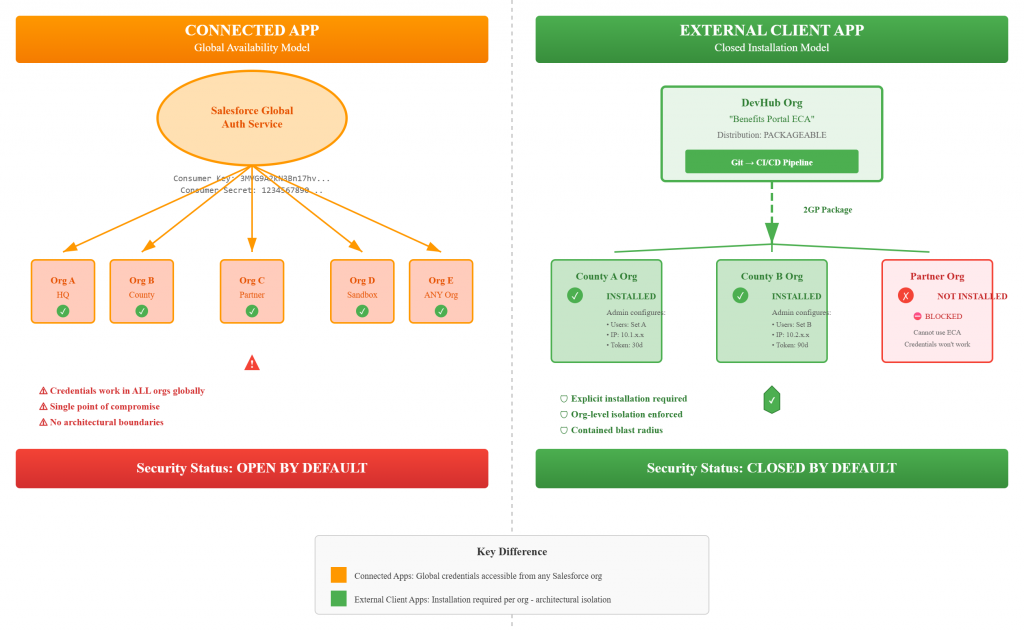
The below is the difference in security risks between a connected app and External connected app.
Create Connected App in Org A
    ↓
Consumer Key: 3MVG9A2kN3Bn17hv...
Consumer Secret: 1234567890...
    ↓
These credentials can authenticate to:
✓ Org A (intended)
✓ Org B (your other production org)
✓ Org C (partner agency org)
✓ Org D (sandbox)
✓ ANY other Salesforce org globally
The 2025 Wake-Up Call:
While I haven’t personally witnessed a security violation at my clients (thanks to strong security practices), the 2025 security incidents proved this isn’t theoretical. Over 700 Salesforce organizations were compromised, exposing 50+ million customer records.
The attack pattern was devastatingly simple:
- Attackers obtained legitimate Consumer Key/Secret pairs (through phishing, GitHub exposure, or social engineering)
- Used those credentials to target different organizations
- Social engineered users in victim orgs to authorize access
- Gained access because the OAuth screen appeared legitimate
The proof is clear: Client IDs and Client Secrets can be compromised by external hackers, creating massive security risk.
For a federal agency with multiple orgs—headquarters, regional offices, partner integrations—a single compromised credential set can potentially be weaponized against your entire infrastructure.
The Multi-Org Deployment Challenge
Government agencies rarely operate in a single org. A typical deployment I see includes:
- 1 headquarters production org
- 10-50 regional/county/field office orgs
- 5-15 partner agency connections
- Multiple sandbox environments
With Connected Apps, each deployment means:
- Manual configuration in each org
- Copy/paste of OAuth settings
- Individual policy setup
- No guarantee of consistency
- Configuration drift over time
- Difficult to maintain security baseline
I’ve watched teams spend weeks deploying the same Connected App configuration across a multi-org landscape, then more weeks keeping them in sync when requirements change.
What Federal Clients Tell Me
When I talk with government CIOs, CISOs, and Enterprise Architects about integration challenges, three pain points consistently emerge:
- “We can’t track who changed what in our integrations”
- No version control for OAuth policies
- Manual documentation processes
- Audit preparation is brutal
- “We’re concerned about credential security”
- Single point of failure (one credential set)
- Global availability creates cross-org risk
- No architectural isolation between environments
- “Multi-org deployment is killing us”
- Too much manual work
- Configuration inconsistencies
- Can’t maintain security baseline across orgs
The Compliance Time Tax
Here’s a concrete example of the business impact:
That federal agency I mentioned? They estimated they spent 120+ hours per year on Connected App compliance activities:
- Quarterly audit preparation: 40 hours
- Annual ATO renewal: 60 hours
- Ad-hoc CISO inquiries: 20 hours
With External Client Apps and proper metadata tracking, we estimate they could reduce this by 90%—saving over 100 hours annually and dramatically improving their security posture.
Framing the Problem for Leadership
When I present to government Architects, CISOs, or CIOs, here’s how I frame the Connected App challenge:
“If you have several applications integrated with your Salesforce org and you’re concerned about the security of how these applications connect—particularly around audit capability, change tracking, and reducing the risk of security violations—you need to understand External Client Apps.
ECAs solve three critical problems:
- Compliance: Full version control and change tracking for audit requirements
- Security: Org-level isolation and installation-based access control
- Efficiency: Automated multi-org deployment with consistent security baseline
For organizations with ATO requirements, ECAs aren’t just better—they’re essential.”
The Bottom Line
Connected Apps were designed before:
- Modern DevOps and version control became standard
- The 2025 security breaches exposed global credential vulnerabilities
- Multi-org deployments became the norm for government agencies
- Continuous compliance and ATO requirements demanded detailed audit trails
They’re not bad—they’re just not built for the challenges federal and state agencies face today.
External Client Apps represent a fundamental rearchitecting of how Salesforce handles external integrations, with security, compliance, and governance built in from the ground up.
In the next section, we’ll explore exactly what makes External Client Apps different—and why they’re the future of government Salesforce integrations.
2. Understanding External Client Apps
What Are External Client Apps?
Here’s my elevator pitch when talking to federal agencies and state governments: External Client Apps (ECAs) are a secure, auditable, and trackable way to keep applications integrated with Salesforce while dramatically reducing compliance burden.
Unlike Connected Apps, ECAs were built from the ground up with three core principles that matter to government organizations: closed by default security (apps must be explicitly installed per org), full metadata compliance (every change is version-controlled and trackable), and role-based configuration (clear separation between developer settings and admin security policies). The result? You get org-level security isolation that eliminates the cross-org credential risk, complete audit trails that satisfy your CISO, and the ability to deploy consistently across multiple orgs while maintaining independent security controls. For organizations spending hundreds of hours on integration compliance, ECAs aren’t just an improvement—they’re a fundamental rearchitecting of how Salesforce handles external integrations with security and governance built in from day one.
The Key Differentiator: Developer vs. Admin Separation
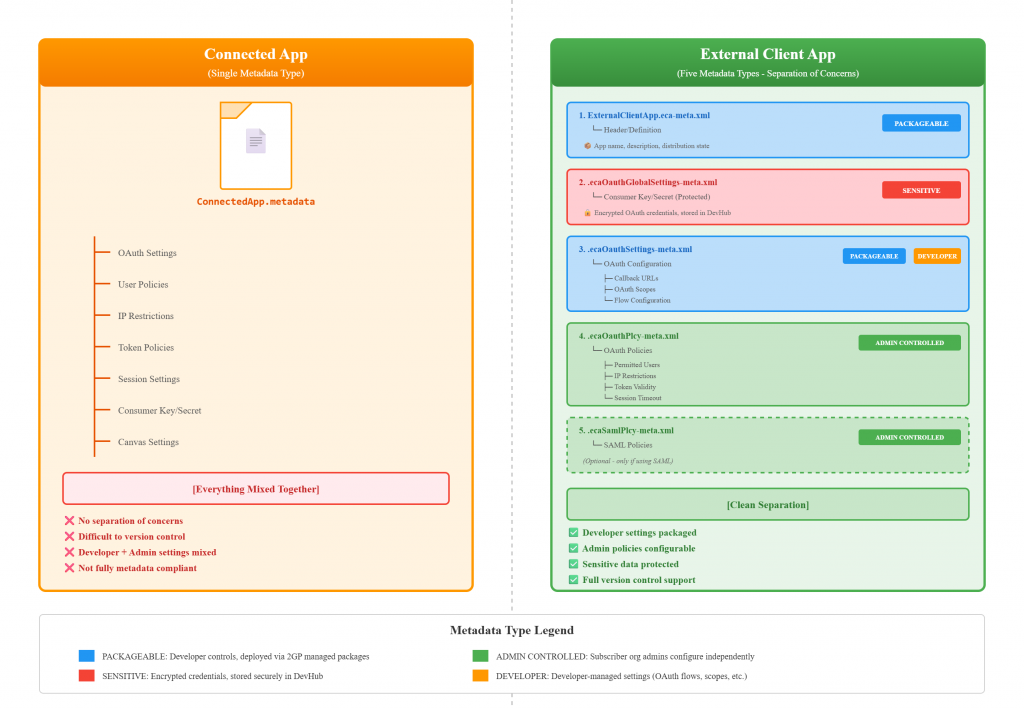
The single most important architectural difference is how ECAs separate concerns through five distinct metadata types instead of Connected Apps’ monolithic single file. Developers control packageable settings (OAuth flows, scopes, callback URLs) that define how the integration works, while administrators control security policies (permitted users, IP restrictions, refresh token validity, session timeouts) that define who can use it and under what conditions. This separation is critical for two reasons: first, it gives you the audit trail and version control government compliance demands—every developer change is tracked in Git, every admin policy change is in Setup Audit Trail, and you can answer “who changed what and when” in minutes instead of weeks. Second, it provides org-level security isolation because ECAs are just the gateway to your org—the actual data access still comes from your Salesforce security configuration using profiles and permission sets, meaning even if an ECA is installed, users only access data they’re already authorized to see through your existing security model.
Technical Metadata Breakdown (For Architects)
For fellow Salesforce architects who need the technical details, here’s what goes into each of the five metadata types:
- ExternalClientApp.eca-meta.xml → Header/definition (app name, distribution state)
- ecaOauthGlobalSettings-meta.xml → Consumer Key/Secret (encrypted, stored in DevHub) [SENSITIVE]
- ecaOauthSettings-meta.xml → OAuth configuration (flows, scopes, callbacks) [PACKAGEABLE – Developer controlled]
- ecaOauthPlcy-meta.xml → OAuth policies (users, IPs, tokens, sessions) [ADMIN CONTROLLED – Subscriber org admins]
- ecaSamlPlcy-meta.xml → SAML policies (optional) [ADMIN CONTROLLED]
The packageable metadata (types 1, 3) can be version-controlled in Git and deployed via 2GP managed packages, while admin-controlled policies (types 4, 5) are configured independently in each subscriber org—giving you both consistency and flexibility.
Key Takeaway: ECAs solve the compliance nightmare by separating what developers build (version-controlled settings) from what admins secure (org-specific policies), all while providing the audit trail federal agencies need and the org-level isolation that eliminates cross-org security risks.
3. The Security Model Difference
Architectural Security: Flexibility Over “One Size Fits All”
The fundamental security difference between Connected Apps and External Client Apps is this: ECAs aren’t a one-size-fits-all solution for each integration—they provide flexible security with audit capability and tracking that can be installed for each org to fit individual agency needs. With Connected Apps, you’re stuck with global credentials that work across any Salesforce org, creating cross-org security exposure and a single point of failure. ECAs flip this model by requiring explicit installation per org, giving you three critical security capabilities that federal agencies need: comprehensive audit trails (every change tracked in metadata for FedRAMP and ATO compliance), robust credential management (credentials isolated per org installation, not globally available), and granular multi-org access control (each agency configures their own security policies independently). This architectural approach directly supports NIST 800-53 controls around access control (AC family), audit and accountability (AU family), and identification and authentication (IA family). The result is a security model that scales across your federated government architecture—headquarters can maintain consistent OAuth settings through packaging, while regional offices, field locations, and partner agencies maintain independent security policies tailored to their specific risk profiles and compliance requirements.
Key Takeaway: ECAs provide the flexible, auditable, org-level security that government agencies need to meet FedRAMP, NIST, and ATO requirements—replacing the rigid, globally-available Connected App model with installation-based access control.
4. Well-Architected Framework Comparison
Evaluating ECAs Through the Well-Architected Lens
I use the Salesforce Well-Architected Framework with all my clients—it’s the industry-standard approach for evaluating architectural decisions, and government architects are familiar with it. When comparing Connected Apps to External Client Apps across the five critical pillars, ECAs demonstrate clear superiority in the areas that matter most to federal agencies: Security (ECAs score 10/10 vs CAs’ 6/10 due to org-level isolation and closed-by-default architecture), Operational Excellence (10/10 vs 5/10 through full metadata compliance enabling version control and automated deployments), Reliability (10/10 vs 7/10 with metadata-based disaster recovery and environment parity), Long-Term Costs (9/10 vs 6/10 by reducing multi-org deployment effort by 85-95%), and most critically for government, Trusted/Compliance (10/10 vs 6/10 with enhanced audit trails and governance). The Trusted pillar is where ECAs truly shine for federal agencies—ECAs can reduce ATO compliance time dramatically because Salesforce teams can now track changes on integration configurations within hours using the version control and tracking capability of the metadata, rather than spending weeks reconstructing change history from backups and manual documentation. When you combine this compliance efficiency with the Long-Term Costs savings (eliminating hundreds of hours of manual multi-org deployment and ongoing configuration management), ECAs deliver a 47% improvement in overall Well-Architected scoring (56/60 vs 38/60), with the biggest gains exactly where government agencies need them most.
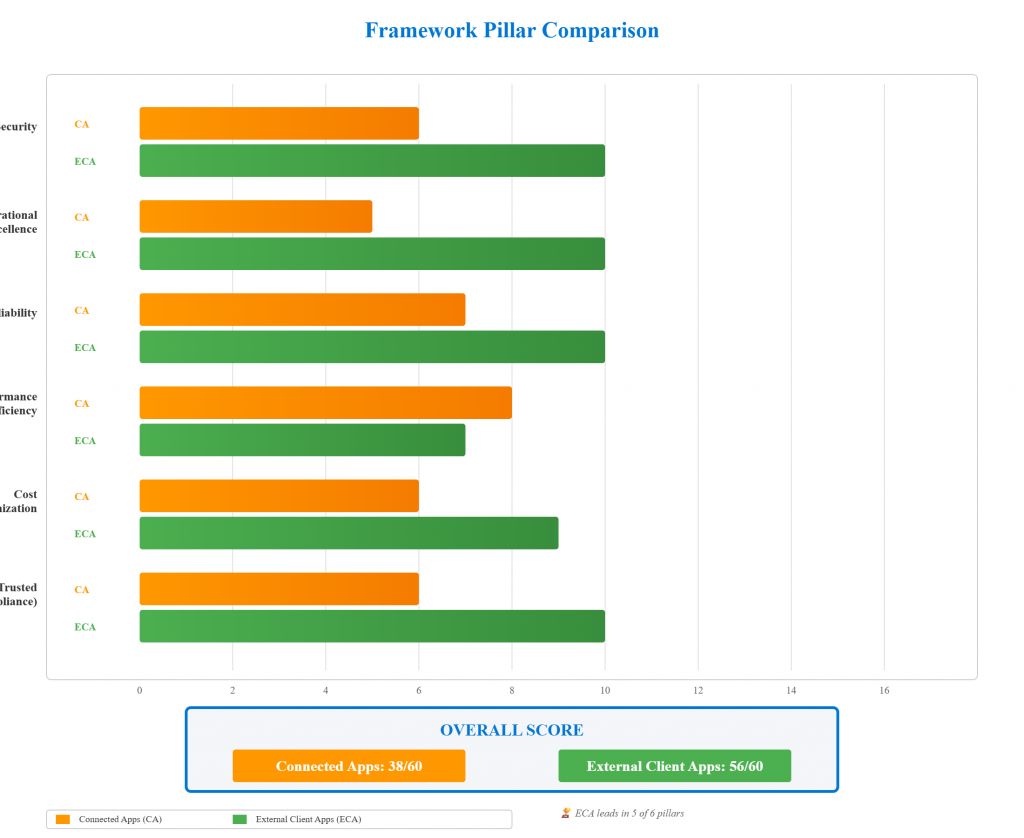
Key Takeaway: Using the Salesforce Well-Architected Framework, ECAs score 56/60 vs Connected Apps’ 38/60, with perfect scores in Security, Operational Excellence, Reliability, and Trusted—directly addressing federal agencies’ top priorities of compliance efficiency and long-term cost reduction.
5. Architecture Patterns
Deployment Models: Single Org vs. Multi-Org
External Client Apps support two primary deployment models depending on your organizational structure. For single-org deployments, you create an ECA with distribution state set to “Local”—this is ideal for agencies with one production Salesforce org integrating with external systems like benefits portals or constituent management platforms, where the ECA is developed, configured, and managed entirely within that single org with no need for packaging or distribution. For multi-org deployments (the more common scenario in government), you set distribution state to “Packageable” and leverage a DevHub org to maintain the ECA as a 2GP managed package—this pattern works perfectly for state governments with headquarters plus regional offices, federal agencies with field locations, or multi-agency collaborations where you need consistent OAuth settings across all orgs but independent security policies per location. The multi-org approach gives you the best of both worlds: developers maintain OAuth flows, scopes, and callbacks in version-controlled metadata deployed via package, while each subscribing org’s administrators independently configure their permitted users, IP restrictions, refresh token policies, and session timeouts based on their specific security requirements and risk profiles. This architectural flexibility means whether you’re managing a single federal agency or coordinating across dozens of state and county entities, ECAs scale to your governance model.
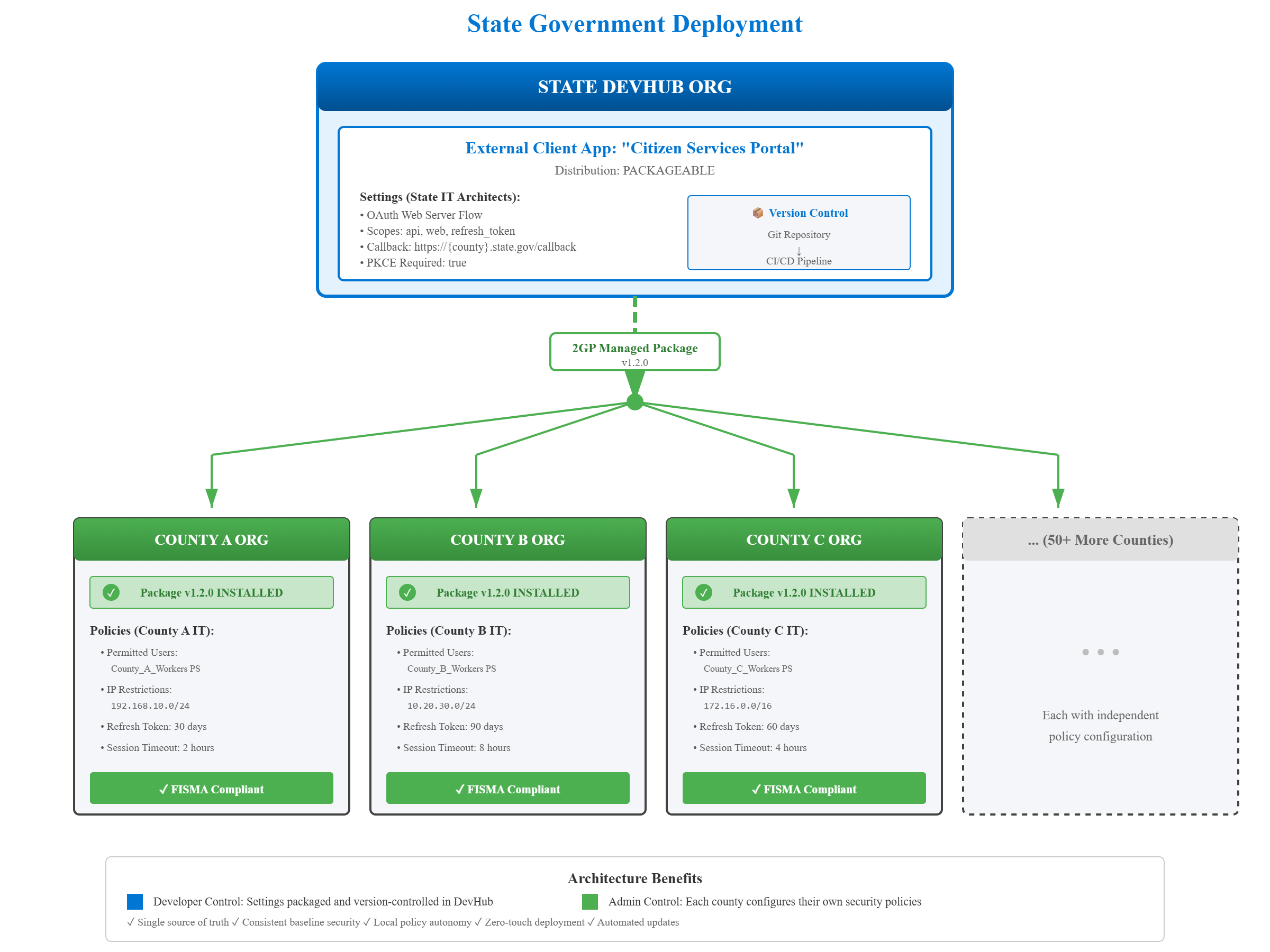
Key Takeaway: ECAs support both single-org (Local) and multi-org (Packageable) deployments—giving government agencies the flexibility to match their ECA architecture to their organizational structure, whether centralized or federated.
6. Real-World Use Cases
Federal Multi-Department Deployment
I recently worked with a federal agency managing multiple Salesforce orgs across different departments—each with its own mission-critical integrations. Their primary challenge was the compliance burden: auditing Connected Apps and tracking configuration changes consumed hundreds of hours annually because there was no version control or automated change tracking, forcing teams to manually reconstruct histories from backups and Setup Audit Trail searches during ATO renewals. The second critical issue was the security risk of sharing a single client secret and client key for integrations across multiple departmental orgs—this created a compliance nightmare because one compromised credential could potentially impact all departments, and auditors repeatedly flagged this as a high-risk configuration during security reviews. By migrating to External Client Apps, they solved both problems: the version tracking capability integrates directly with their source control tools (Git), giving them complete audit trails that answer “who changed what, when, and why” in minutes instead of weeks, while the per-org installation model eliminates the shared credential risk by providing architectural isolation between departments. The result was a 90% reduction in compliance time and a security posture that finally satisfied their CISO and passed federal audit requirements without remediation findings.
Global Manufacturing with Regional Compliance
Another compelling scenario involved a global manufacturing company operating Salesforce orgs across three continents—North America, Europe, and Asia—each with distinct data access requirements and regulatory obligations. The challenge was architecting integrations for legacy applications that needed different permissions per continental org: the European org had to meet strict GDPR regulations requiring granular data access controls and the ability to demonstrate “privacy by design,” while Asian and American orgs had different compliance frameworks and operational data needs. With Connected Apps, they were stuck with a one-size-fits-all approach that either over-permissioned some regions (compliance violation) or under-permissioned others (operational failure), and tracking which permissions applied where became a governance nightmare. External Client Apps solved this by enabling the Salesforce team to deploy region-specific ECAs with different admin and developer permission configurations: European administrators could enforce GDPR-compliant data access policies independently, Asian teams could configure their regulatory requirements, and American operations could optimize for their compliance framework—all while maintaining consistent OAuth settings for the core integration functionality. This gave them the compliance flexibility and audit tracking capability they needed to satisfy regional regulators while maintaining operational efficiency across their global Salesforce footprint.
Conclusion: The Path Forward
External Client Apps represent more than an incremental improvement over Connected Apps—they’re a fundamental rearchitecting of how Salesforce approaches external integrations, built specifically for the challenges federal agencies and regulated industries face today: rigorous compliance requirements, multi-org federated architectures, and security-first governance models. For government organizations spending hundreds of hours on integration audits, struggling with credential security across multiple orgs, or trying to maintain consistent security baselines while respecting agency autonomy, ECAs deliver measurable value through version-controlled metadata (reducing compliance time by 90%), org-level security isolation (eliminating cross-org credential risks), and flexible deployment models (scaling from single agencies to multi-state collaborations). The Well-Architected Framework comparison speaks for itself: ECAs score 56/60 versus Connected Apps’ 38/60, with perfect scores in the pillars that matter most to government—Security, Trusted/Compliance, and Operational Excellence.
Ready to modernize your Salesforce integrations? The era of Connected Apps is ending—External Client Apps are the secure, auditable, and scalable future of government Salesforce architecture. As always you are welcome to post your comments or email me at buyan@eigenx.com for further questions