Government agencies implementing Salesforce Public Sector Solutions face a unique challenge: how do you provide secure, compliant access to sensitive benefit information for community portal users while maintaining strict data privacy standards?
When citizens submit claims through a community portal—often involving highly sensitive personal health information (PHI), financial data, and legal documentation—the security model must be both flexible and ironclad.
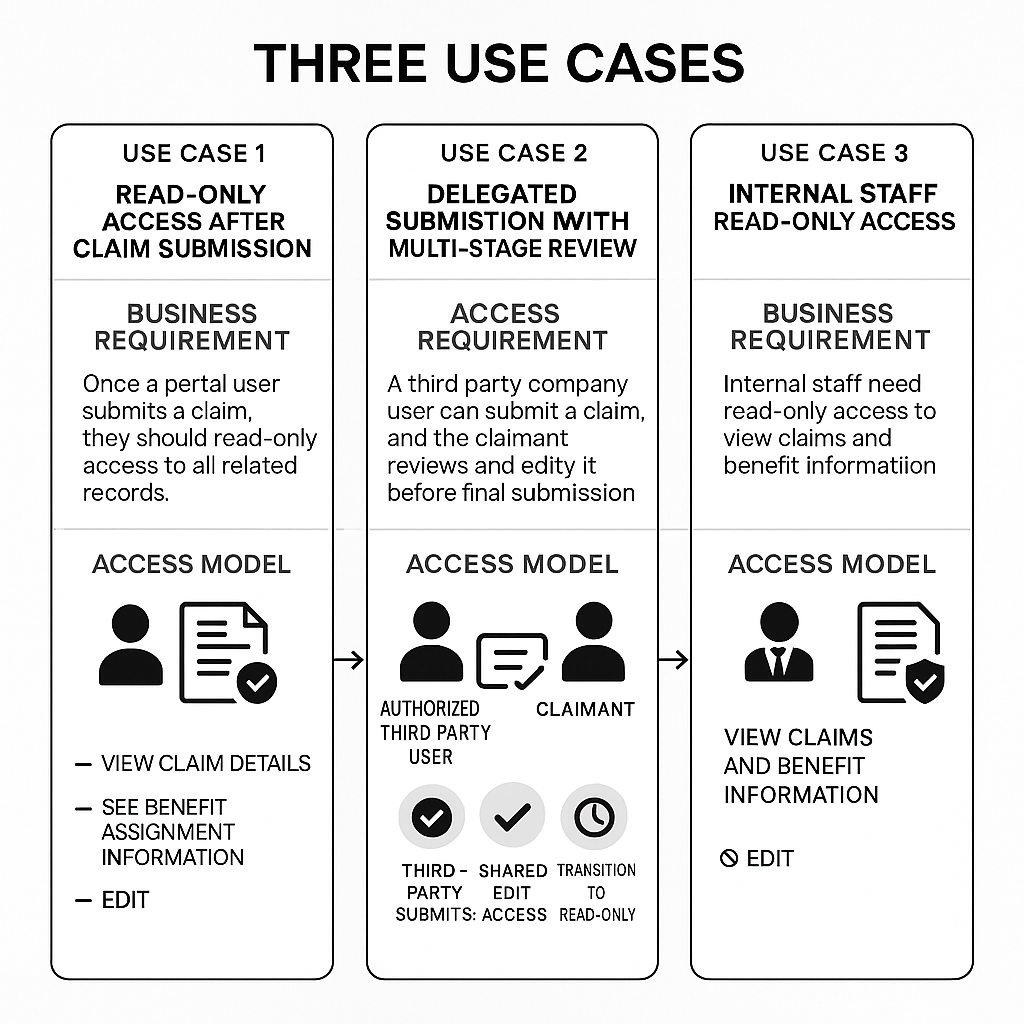
In this post, I’ll walk through three critical use cases that shaped our architectural decision for a government client’s community portal security model. These use cases reveal why traditional sharing mechanisms fall short and what it takes to build a truly secure, compliant portal experience.
The Context: A 50-Step Claims Submission Process
Our government client needed to support a complex claims workflow where:
- Portal users (citizens) submit claims through a 50-step OmniScript form
- Each claim creates records across 6 different objects: Claim, Claim Participant, Benefit Assignment, Benefit Assignment Adjustment, Benefit Disbursement, and Benefit Disbursement Adjustment
- The form collects 5 sections of sensitive data: Personal Data, Health Data, Presence Data, Lawsuit Data, and Compensation Data
- Portal users need ongoing access to view their claims and benefit information
- Internal staff need to review claims without the ability to modify them
The challenge? Creating a security model that handles three distinct access patterns while maintaining HIPAA compliance and federal data privacy requirements.
Let’s dive into each use case.
Use Case 1: Read-Only Access After Claim Submission
The Business Requirement
Once a portal user submits their claim, they should have read-only access to all related records.
This seems straightforward, but it’s harder than it sounds in Salesforce. The portal user needs to:
- View their claim details
- See all benefit assignment information
- Track benefit disbursements and adjustments
- NOT be able to edit any information once submitted
Why This Matters
In government benefit programs, claim integrity is paramount. Once a claim is submitted:
- It becomes part of the official record
- Modifications must go through formal amendment processes
- Audit trails must show who changed what and when
- Unauthorized changes could constitute fraud
The Technical Challenge
Salesforce sharing mechanisms typically grant access to records, but controlling whether that access is read-only or editable is a separate concern. Here’s what doesn’t work:
❌ Criteria-Based Sharing Rules: Sharing rules can grant access to records, but they can’t distinguish between read and edit access. You’d need a complex combination of:
- Sharing rules (for record access)
- Validation rules (to block edits)
- Permission sets (to remove edit permissions)
- Page layouts (to hide edit buttons)
This multi-layer approach creates gaps, confusion, and maintenance nightmares.
❌ Sharing Sets: Sharing sets grant access based on set membership, but you’d need to manage users across 12+ different sharing sets (one for “edit” and one for “read-only” for each of the 6 objects). When a claim is submitted, you’d need to move users from edit sets to read-only sets asynchronously, creating timing issues.
The Solution: Apex Managed Sharing
✅ With Apex sharing, we create share records with explicit access levels:
// When claim is submitted with Status = "Submitted"
ClaimShare claimShare = new ClaimShare();
claimShare.ParentId = claim.Id;
claimShare.UserOrGroupId = portalUser.Id;
claimShare.AccessLevel = 'Read';  // Explicitly READ-ONLY
claimShare.RowCause = Schema.ClaimShare.RowCause.Claimant_Owner__c;
insert claimShare;
This approach:
- ✅ Enforces read-only access at the platform level
- ✅ Applies consistently across all 6 related benefit objects
- ✅ Provides clear audit trails with sharing reason codes
- ✅ Eliminates the need for validation rules or multi-layer workarounds
💡 Key Takeaway: For government portals handling sensitive data, read-only enforcement must happen at the sharing layer, not through a patchwork of validation rules and permission restrictions.
Use Case 2: Delegated Submission with Multi-Stage Review
The Business Requirement
A third-party company user can submit a claim on behalf of a claimant. The claimant then logs in to review and edit the claim before final submission.
This introduces a complex multi-party, multi-stage access pattern:
- Initial Submission: Third-party company user submits claim (needs EDIT access)
- Claimant Review: Claimant logs in to review the claim (needs EDIT access while Claim Status = “Review”)
- Third-party company Monitoring: Third-party company user continues to have access to monitor progress (needs EDIT access during review)
- Final Submission: When claimant completes review, both parties transition to READ-ONLY access
Why This Matters
Legal representation is common in government benefit claims:
- Disability benefits often involve attorney representation
- Veterans benefits may be filed through VSO representatives
- Complex claims require professional assistance
- Claimants must verify information before final submission
The security model must support this collaborative workflow while ensuring:
- Both parties can only access their specific claims
- Access levels change dynamically based on claim status
- No party can access another law firm’s or claimant’s data
- Full audit trail shows who accessed what and when
The Technical Challenge
This is where most declarative sharing approaches completely break down.
❌ Criteria-Based Sharing Rules: Can’t target two different users with different access levels to the same record. You’d need separate rules for law firm users and claimants, but rules can’t distinguish between them dynamically.
❌ Sharing Sets: Would require 18+ sharing sets:
- 6 sets for law firm edit access (one per object)
- 6 sets for claimant review edit access
- 6 sets for both parties’ final read-only access
Managing users across these sets during status transitions creates a coordination nightmare with high failure risk.
The Solution: Apex Managed Sharing with Status Triggers or Flow with Sub/flows
✅ Apex sharing handles multi-party access elegantly:
Step 1: Law Firm Submits Claim
// Create sharing for law firm user (Edit access)
ClaimShare lawFirmShare = new ClaimShare();
lawFirmShare.ParentId = claim.Id;
lawFirmShare.UserOrGroupId = lawFirmUser.Id;
lawFirmShare.AccessLevel = 'Edit';
lawFirmShare.RowCause = Schema.ClaimShare.RowCause.Law_Firm_Submitter__c;

// Create sharing for claimant (Edit access during review)
ClaimShare claimantShare = new ClaimShare();
claimantShare.ParentId = claim.Id;
claimantShare.UserOrGroupId = claimantUser.Id;
claimantShare.AccessLevel = 'Edit';
claimantShare.RowCause = Schema.ClaimShare.RowCause.Claimant_Review_Edit__c;

insert new List<ClaimShare>{lawFirmShare, claimantShare};
Step 2: Claimant Completes Review – Status Changes to “Submitted”
// Trigger on Claim Status Change
public static void transitionToReadOnly(Claim__c claim) {
    // Delete existing edit-level shares
    List<ClaimShare> existingShares = [
        SELECT Id FROM ClaimShare
        WHERE ParentId = :claim.Id
        AND RowCause IN ('Law_Firm_Submitter__c', 'Claimant_Review_Edit__c')
    ];
    delete existingShares;

    // Create new READ-ONLY shares for both parties
    List<ClaimShare> readOnlyShares = new List<ClaimShare>();
    for(Claim_Participant__c participant : claim.Claim_Participants__r) {
        ClaimShare readShare = new ClaimShare();
        readShare.ParentId = claim.Id;
        readShare.UserOrGroupId = participant.Portal_User__c;
        readShare.AccessLevel = 'Read';
        readShare.RowCause = Schema.ClaimShare.RowCause.Claim_Submitted__c;
        readOnlyShares.add(readShare);
    }
    insert readOnlyShares;
}
This approach:
- ✅ Creates separate sharing records for each party with distinct access levels
- ✅ Uses sharing reason codes to document why each party has access
- ✅ Handles status-based transitions automatically through triggers
- ✅ Maintains consistency across all 6 benefit objects in a single transaction
- ✅ Provides complete audit trail for compliance
⚠️ Critical Insight: Multi-party access with dynamic permissions is nearly impossible to implement correctly using declarative sharing alone. This use case alone eliminates sharing rules and sharing sets as viable options.
Use Case 3: Internal Staff Read-Only Access
The Business Requirement
Internal Salesforce CRM users (case workers, reviewers, auditors) need to view claims and benefit information in read-only format.
This seems simple until you realize:
- Internal users typically have “View All” or “Modify All” permissions through their profiles
- Role hierarchies grant managers broad access to subordinate records
- Organization-wide defaults often give internal users wider access than external portal users
Why This Matters
Government agencies must enforce separation of duties:
- Reviewers should view claims but not modify them
- Auditors need read access for compliance checks
- Supervisors monitor team performance without editing claims
- Data integrity requires preventing accidental or unauthorized changes
The challenge: How do you restrict internal users when Salesforce’s default model is to grant them broad access?
The Technical Challenge
Here’s the uncomfortable truth: No sharing mechanism can restrict internal users with object-level permissions.
❌ Sharing Rules: Only grant access; they can’t take it away. Sharing rules don’t apply to users with “View All” or “Modify All” permissions.
❌ Apex Sharing: Same limitation. Apex sharing grants access to records, but it doesn’t restrict users who already have object-level access through profiles or permission sets.
❌ Sharing Sets: Only apply to community users, not internal CRM users.
The Solution: Permission Sets + Page Layouts (Separate Architecture)
Internal user restrictions require a completely different architectural approach:
✅ Custom Permission Sets for Read-Only Access:
Permission Set: "Benefit_Objects_Read_Only"

Object Permissions:
├── Claim
│   ├── Read: ✓
│   ├── Create: ✗
│   ├── Edit: ✗
│   └── Delete: ✗
├── Benefit Assignment
│   ├── Read: ✓
│   ├── Create: ✗
│   ├── Edit: ✗
│   └── Delete: ✗
└── [Repeat for all 6 objects]

Field-Level Security:
└── All fields: Read-Only ✓
✅ Read-Only Page Layouts:
- All fields configured as read-only
- Edit, Delete, Clone buttons removed
- Assigned to internal reviewer profiles
✅ Record Types (Optional):
- Separate record type for “Under Review” claims
- Limits available page layouts and actions
This approach:
- ✅ Works independently of the portal user sharing mechanism
- ✅ Leverages Salesforce’s native permission model
- ✅ Easy for admins to understand and maintain
- ✅ Doesn’t interfere with portal user apex sharing
🚨 Important Note: Use Case 3 is NOT a differentiator between sharing mechanisms. All approaches (sharing rules, apex sharing, sharing sets) require the same separate permission set solution for internal users. Don’t let vendors tell you otherwise.
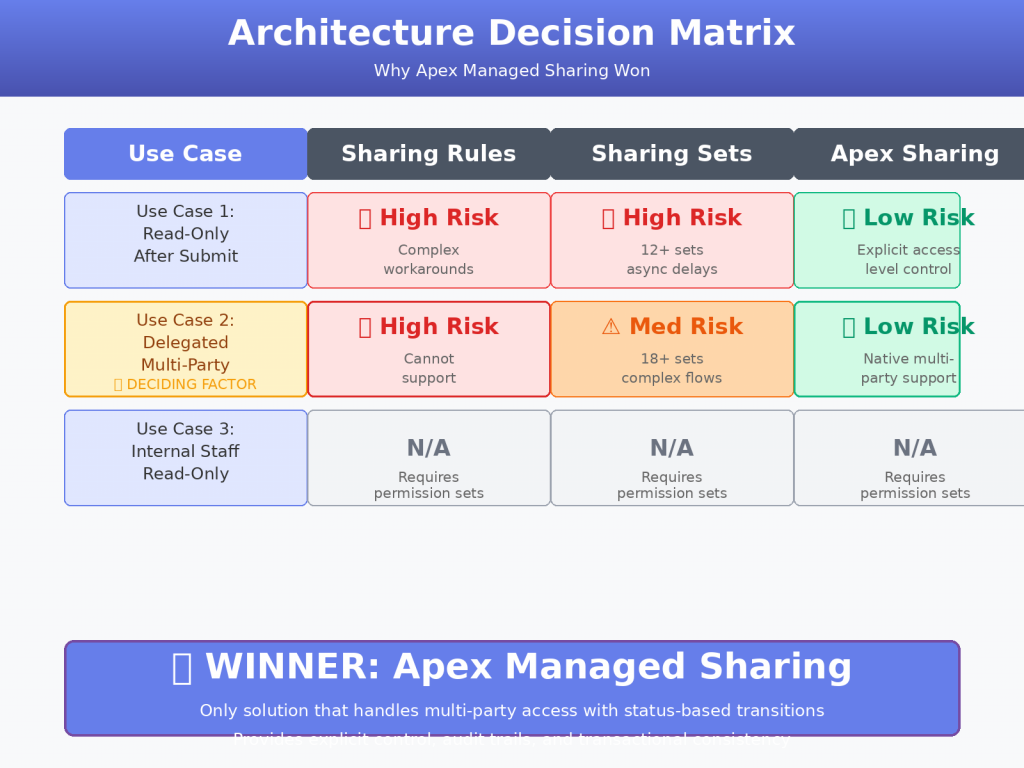
The Architecture Decision: Why Apex Managed Sharing Won
After analyzing these three use cases, the decision became clear:
| Use Case | Sharing Rules | Apex Sharing | Sharing Sets |
|---|---|---|---|
| Use Case 1: Read-Only After Submit | ❌ High Risk Requires complex workarounds | ✅ Low Risk Explicit access level control | ❌ High Risk 12+ sets, async delays |
| Use Case 2: Delegated Multi-Party | ❌ High Risk Cannot support | ✅ Low Risk Native multi-party support | ⚠️ Medium Risk 18+ sets, complex flows |
| Use Case 3: Internal Read-Only | N/A Requires permission sets | N/A Requires permission sets | N/A Requires permission sets |
Use Case 2 was the deciding factor. Delegated submission with multi-party, status-based access is nearly impossible to implement correctly without programmatic sharing control.
What We Gained with Apex Sharing
- ✅ Explicit access control with Read vs. Edit levels
- ✅ Multi-party access with different permissions for same record
- ✅ Status-based transitions through triggers
- ✅ Audit trail with sharing reason codes
- ✅ Cross-object consistency across 6 benefit objects
- ✅ Transactional integrity – access granted in same transaction as record creation
What We Accepted as Trade-offs
- ⚠️ Requires developers to maintain apex code
- ⚠️ More complex for non-technical admins to understand
- ⚠️ Governor limits to monitor (1M sharing records per object)
- ⚠️ Test coverage requirements (75% for deployment)
For government implementations with complex security requirements, these trade-offs are acceptable and manageable.
Key Lessons for Salesforce Architects
1. Use Cases Drive Architecture, Not Features
Don’t choose a sharing mechanism based on “ease of use” or “declarative vs. code.” Choose based on whether it can actually solve your use cases. Sharing rules are “easier” until you realize they can’t enforce read-only access.
2. Multi-Party Access Requires Programmatic Control
If your portal involves representatives, attorneys, guardians, or any third-party submissions, declarative sharing won’t cut it. You need the flexibility to create multiple sharing records with different access levels and reason codes.
3. Status-Based Security Is Not Optional in Government
Government workflows have strict stage gates. When a claim moves from “Draft” to “Review” to “Submitted,” access must change automatically and reliably. Asynchronous sharing set membership changes introduce unacceptable delays and failure points.
4. Internal User Restrictions Are a Separate Concern
Never conflate portal user sharing with internal user permissions. They’re architecturally distinct problems requiring different solutions. Any vendor claiming their sharing mechanism “handles both” is overselling.
5. Compliance Demands Explicit Audit Trails
For HIPAA, FedRAMP, and other government compliance frameworks, you need to answer: “Why does User X have access to Record Y?” Sharing reason codes provide this. Criteria-based sharing rules don’t.
Conclusion: Security Architecture Is About Managing Complexity
The three use cases we explored reveal a fundamental truth: government portal security is inherently complex.
You can either:
- Fight the complexity by forcing declarative tools to do things they weren’t designed for (resulting in brittle, unmaintainable workarounds)
- Embrace the complexity by using programmatic tools that give you the control and flexibility you need (resulting in maintainable, testable, auditable solutions)
For our government client, Apex Managed Sharing was the only architecturally sound choice. It’s the only mechanism that could handle:
- ✅ Read-only enforcement after submission
- ✅ Multi-party delegated access with status-based transitions
- ✅ Comprehensive audit trails for compliance
- ✅ Cross-object consistency across 6 benefit objects
If you’re building a community portal for public sector, healthcare, or any industry with complex multi-party workflows and strict compliance requirements, don’t default to “declarative is always better.”
Sometimes, the right architecture is the one that works. If you want to do this using Flows, here is a great article that you can use as a reference to implement apex sharing with Flows.
What’s Your Portal Security Challenge?
Are you facing similar challenges with multi-party access, status-based permissions, or compliance requirements in your Salesforce implementation?
Drop a comment below with your toughest portal security use case. I’d love to hear how you’re solving these challenges (or where you’re stuck).
And if you found this post helpful, share it with your Salesforce architect community. Complex security problems deserve thoughtful solutions, not one-size-fits-all recommendations.