


The Spring ’26 release introduces three capabilities that address persistent pain points in Salesforce deployment, data processing, and integration architecture. Based on my experience with over 100 Salesforce implementations, these features represent solutions to problems I’ve encountered repeatedly across enterprise organizations. Let’s examine each through the lens of the Well-Architected Framework—comparing where we are today with where these features take us.
Run Relevant Tests: From Deployment Bottlenecks to Intelligent Testing
The Current State Problem
Your development team changes a single Apex class—maybe updating a validation method in your opportunity processing logic. To deploy this change to production, you select RunLocalTests in your deployment configuration. The platform executes 2,847 test methods across your entire org.
The wait begins.
Forty-five minutes later, the deployment completes. The changed class had 3 directly related test classes, but the platform had no way to know that. It ran tests for Account triggers, Case assignment logic, custom CPQ calculations—everything. Your team loses nearly an hour for a 5-minute code change.
This scenario repeats across enterprise orgs daily:
- Large test suites (1,000+ test classes) routinely take 30-60 minutes
- Every deployment runs the same comprehensive suite regardless of scope
- Development velocity suffers as teams wait for unrelated tests
- CI/CD pipelines become bottlenecks rather than accelerators
How Run Relevant Tests Solves This

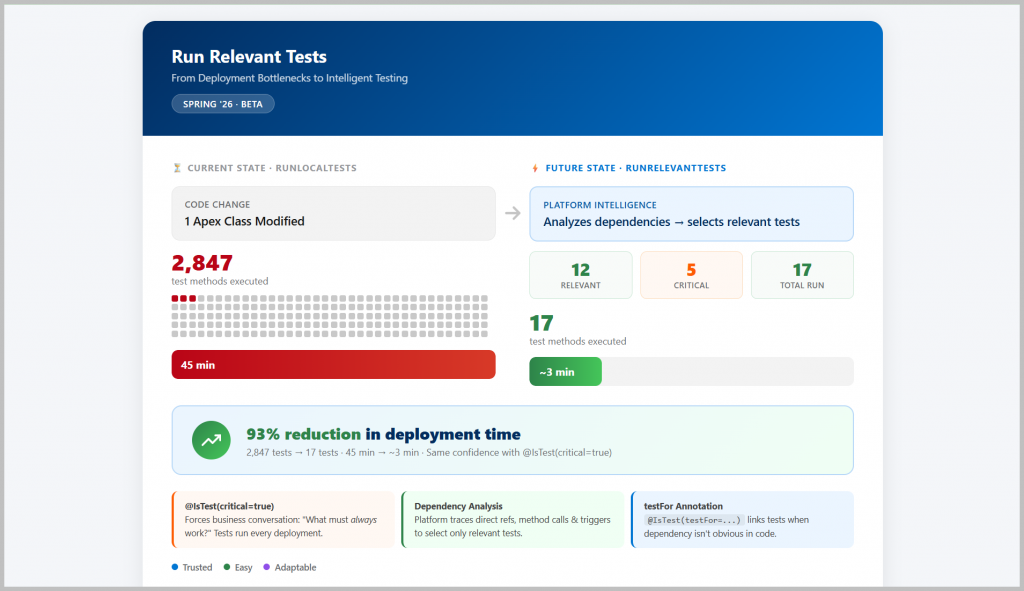
Spring ’26 introduces a new test level option: RunRelevantTests. When you deploy, the platform analyzes your changes and intelligently determines which tests actually validate the code you’re deploying.
sf project deploy start --test-level RunRelevantTestsThe platform examines dependencies:
- Direct references: If you change
OpportunityUtils, tests that instantiateOpportunityUtilsrun automatically - Method calls: Tests invoking methods from changed classes are included
- Triggers: Tests that exercise modified trigger logic run
For that single Apex class change? Instead of 2,847 tests running for 45 minutes, perhaps 12 relevant tests execute in 3 minutes.
The feature also introduces two new @IsTest annotation parameters for scenarios requiring human judgment:
@IsTest(critical=true) – Mark tests that should always run, even if the platform doesn’t detect code dependencies. Example: tests that validate org configuration like validation rules or workflow behavior.
@IsTest(testFor=’ApexClass:ClassName’) – Explicitly tell the platform “this test validates this class” when the relationship isn’t obvious in code (like dependency injection patterns).
Architect’s Perspective: The Real Test Class Problem
Based on my experience with over 100 Salesforce implementations, I’ve observed a systemic problem: test classes are written to meet code coverage criteria rather than deliver real organizational value. The test classes always meet technical code coverage requirements, take a lot of time to execute, but seldom have assert statements to verify anything meaningful.
This is where the Spring ’26 @IsTest(critical=true) annotation becomes transformative. It forces a crucial conversation between developers and the business.
Here’s what this conversation should sound like:
Developer to Business Team: “Hey business team, what are the critical scenarios that should ALWAYS work no matter what we change? What are the end-to-end processes that, if they break, would cause major production issues?”
Business Response: “Our opportunity-to-quote-to-order flow must always work. Customer portal registration must always function. Month-end financial close processes are non-negotiable.”
The @IsTest(critical=true) annotation helps Salesforce teams establish standard regression or end-to-end testing scenarios that always need to be tested for every deployment. This forces developers to:
- Ask business stakeholders about valid scenarios to be tested every time, irrespective of the code changes
- Write test classes with realistic test data to simulate these business-critical scenarios
- Ensure these tests run always, creating a safety net for production releases
This approach prevents major problems after every release by shifting the focus from “do we have 75% code coverage?” to “have we tested the scenarios that actually matter to the business?”
Well-Architected Framework: Current State vs. Future State
| TRUSTED (Reliable, Compliant, Secure) | EASY (Engaging, Automated, Intentional) | ADAPTABLE (Composable, Resilient) | |
|---|---|---|---|
| Current State | ❌ All tests run every deployment = high confidence but extremely inefficient ❌ No distinction between critical and non-critical tests ⚠️ Teams resort to RunSpecifiedTests and manually select tests (error-prone) ⚠️ Long deployment windows create pressure to skip thorough testing ❌ No governance framework for test categorization | ❌ Binary choice: run everything or manually specify tests ❌ CI/CD pipelines hard-coded to RunLocalTests regardless of change scope ⚠️ Complex deployment orchestration to work around test duration ❌ No mechanism to declare “these tests are foundational” ❌ Test importance implicit in code, not documented | ❌ Deployment time increases linearly with test suite growth ⚠️ Teams create workarounds (separate test orgs, manual test runs) ❌ Scaling challenges as organization grows |
| Future State | ✅ Relevant tests automatically identified and executed ✅ Critical tests explicitly marked, always run ✅ Reduced deployment time without sacrificing quality ✅ Faster deployments enable more frequent, smaller changes (better compliance) ✅ Critical test designation creates clear governance framework | ✅ Platform intelligence eliminates manual test selection ✅ CI/CD pipelines become faster by default ✅ Simple annotation-based control for edge cases ✅ @IsTest(critical=true) explicitly documents test importance ✅ testFor annotations create clear test-to-code contracts | ✅ Deployment time scales with change size, not total test count ✅ Architecture supports continuous test suite growth ✅ Teams can deploy confidently as complexity increases |
Apex Cursors (GA): From Batch Apex Constraints to Flexible Data Processing
The Current State Problem
Your business requires a nightly process to analyze 5 million contact records, score them based on engagement metrics, and update a custom field. Today, you implement this with Batch Apex:
global class ContactScoringBatch implements Database.Batchable<SObject> {
    global Database.QueryLocator start(BatchableContext bc) {
        return Database.getQueryLocator(
            'SELECT Id, LastActivityDate, Email FROM Contact'
        );
    }

    global void execute(BatchableContext bc, List<Contact> scope) {
        // Process 200 contacts (or up to 2,000 with customization)
    }

    global void finish(BatchableContext bc) {
        // Cleanup
    }
}
The constraints become problems:
- Rigid batch size: You’re locked into processing 200 records at a time (default) or up to 2,000. What if analysis shows 500 is optimal for your use case?
- Linear processing only: You process record 1-200, then 201-400, then 401-600. If an error occurs at batch 47, you restart from batch 1 or manually calculate where to resume.
- No mid-process inspection: You can’t easily check “how many records with score > 80 have we found?” without complex state management.
- Heavy framework overhead: The start-execute-finish lifecycle adds complexity even for straightforward processing.
- Record locking issues: When batch Apex jobs run during business hours, users encounter sporadic record locking issues when they try to edit records. The batch jobs themselves can fail with locking exceptions.
For scenarios requiring flexibility—like processing based on API rate limits, resuming from failures, or UI-driven pagination—Batch Apex becomes constraining rather than enabling.
How Apex Cursors Solve This

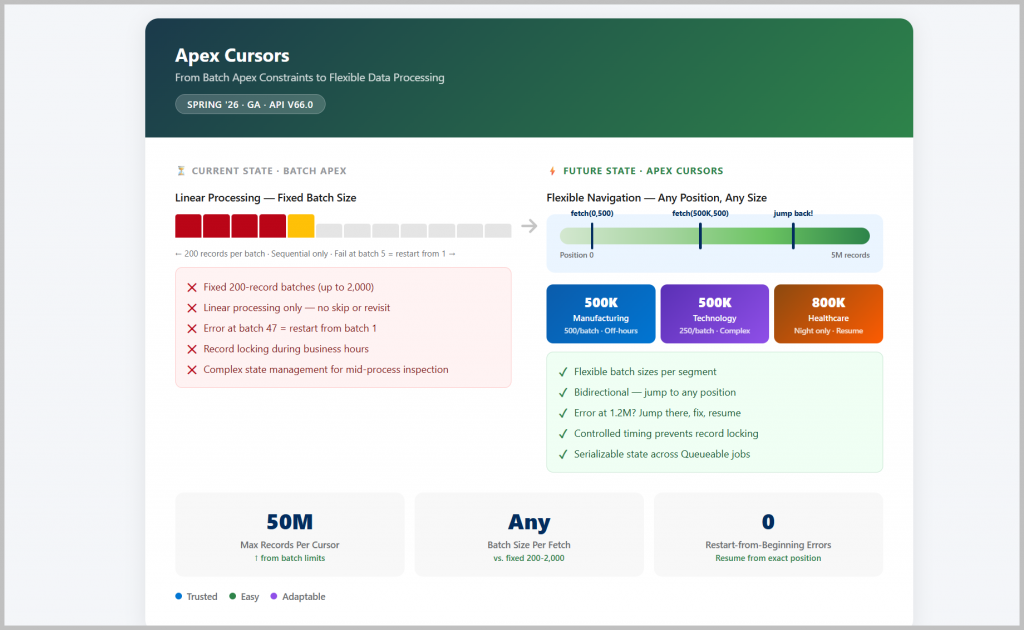
Apex Cursors (now GA in Spring ’26, API v66.0) provide a server-side pointer to query results with complete control over how you fetch and process data:
// Create a cursor pointing to 5 million contacts
Database.Cursor contactCursor = Database.getCursor(
    'SELECT Id, LastActivityDate, Email FROM Contact'
);

// Fetch exactly 500 records starting at position 0
List<Contact> firstBatch = contactCursor.fetch(0, 500);

// Process them...

// Fetch next 500 starting at position 500
List<Contact> secondBatch = contactCursor.fetch(500, 500);

// Or jump backwards if needed
List<Contact> recheck = contactCursor.fetch(250, 100);
Key capabilities:
- Flexible batch sizes: Fetch any number of records per call (within governor limits)
- Bidirectional navigation: Jump to any position, forward or backward
- Serializable state: Save cursor position, pass between Queueable jobs, send to UI
- Scales to 50 million records per cursor
For UI pagination, Spring ’26 adds Database.PaginationCursor that maintains stable page sizes even when records are deleted between fetches—perfect for LWC data tables.
Architect’s Perspective: Smart Data Processing Strategy
I see Apex Cursors as a boon for handling data loads or mass updates involving millions of records—particularly when you’re dealing with accounts and their related records.
Here’s the architectural advantage: Instead of creating traditional Apex batches that process everything linearly, developers can create cursors with ideal separation of accounts based on logical grouping.
For example:
- Manufacturing accounts (positions 0-500,000): Fetch 500 at a time, process during off-hours
- Technology accounts (positions 1,000,000-1,500,000): Process with different batch size based on complexity
- Healthcare accounts (positions 2,000,000-2,800,000): Skip during business hours, resume at night
This logical grouping approach delivers three major benefits:
- Faster processing in batches: You can optimize batch sizes per industry or business category rather than using a one-size-fits-all approach
- Prevent record locking: By controlling exactly when and how records are processed, you can avoid the sporadic locking issues that plague batch Apex jobs running during business hours. Users won’t encounter locked records when they’re trying to work.
- Reduce debugging time: When something goes wrong at position 1,247,500, you can jump directly there, inspect those specific records, fix the issue, and resume—no need to restart from record 1.
My recommendation: If you have batch jobs processing millions of records that always cause headaches during debugging, Apex Cursors are worth exploring as part of a complete architectural rethink.
Well-Architected Framework: Current State vs. Future State
| TRUSTED (Reliable, Compliant, Secure) | EASY (Engaging, Automated, Intentional) | ADAPTABLE (Composable, Resilient) | |
|---|---|---|---|
| Current State | ✅ Batch Apex is mature, stable, production-proven ❌ Rigid error recovery (restart from beginning or complex checkpointing) ⚠️ Fixed batch sizes may not match processing requirements ✅ Respects sharing rules and FLS ✅ Runs in system context with appropriate controls ⚠️ Record locking issues during business hours | ❌ Three-method interface (start/execute/finish) for simple scenarios ❌ State management requires custom code ⚠️ Learning curve for developers new to async processing ❌ Batch size decision made upfront, hard to optimize later ❌ Processing order fixed (sequential) | ⚠️ Batch Apex chains via finish() method (limited flexibility) ❌ Difficult to integrate with Queueable patterns ❌ Not suitable for UI pagination (no client-side state) ⚠️ Governor limits may be hit with large record volumes ❌ Inflexible when processing needs change mid-stream |
| Future State | ✅ Cursor position tracking enables precise error recovery ✅ Fetch exactly the records your process needs per iteration ✅ TransientCursorException allows retry without full restart ✅ Same security model as Batch Apex (sharing rules, FLS respected) ✅ Governor limit visibility via Limits.getApexCursorRows() ✅ Controlled processing prevents user-facing locking issues | ✅ Simple API: getCursor(), fetch(), getNumRecords() ✅ Built-in state management (cursor position) ✅ Lower barrier to entry for async processing ✅ Dynamic batch sizing based on runtime conditions ✅ Non-linear processing (skip ranges, revisit records) ✅ Explicit cursor position management | ✅ Cursors serialize and pass between Queueable jobs ✅ @AuraEnabled support for LWC integration ✅ Mix and match with other async patterns ✅ Process up to 50 million records per cursor ✅ Adapt processing strategy based on runtime metrics ✅ Resume from any position after interruption |
Named Query API (GA): From Integration Complexity to Declarative Data Access
The Current State Problem
Your organization needs to expose Salesforce data to three consumers:
- External mobile app – needs account data filtered by industry
- Agentforce agent – requires opportunity pipeline information
- Partner integration – requests contact lists with specific criteria
Today’s options, today’s problems:
Option 1: Write Apex REST Classes
@RestResource(urlMapping='/accounts/*')
global class AccountRestService {
    @HttpGet
    global static List<Account> getAccountsByIndustry() {
        String industry = RestContext.request.params.get('industry');
        String maxRecords = RestContext.request.params.get('maxRecords');

        // Build query, handle parameters, enforce security...
        // 50+ lines of boilerplate for simple data access
    }
}
Problems:
- ❌ Requires Apex development for every query variation
- ❌ Manual security enforcement (FLS, object permissions)
- ❌ Code deployment required for query changes
- ❌ Each consumer needs separate endpoints or complex routing
Option 2: Build Invocable Flows
Problems:
- ❌ Flow complexity for parameterized queries
- ❌ Not directly accessible via REST API
- ❌ Limited flexibility for integration scenarios
Option 3: Direct SOQL via REST API
GET /services/data/v66.0/query?q=SELECT+Id,Name+FROM+AccountProblems:
- ❌ Consumers must know SOQL syntax
- ❌ No reusability—every consumer writes their own queries
- ❌ Difficult to version or govern
- ❌ Exposes data model directly to external systems
How Named Query API Solves This

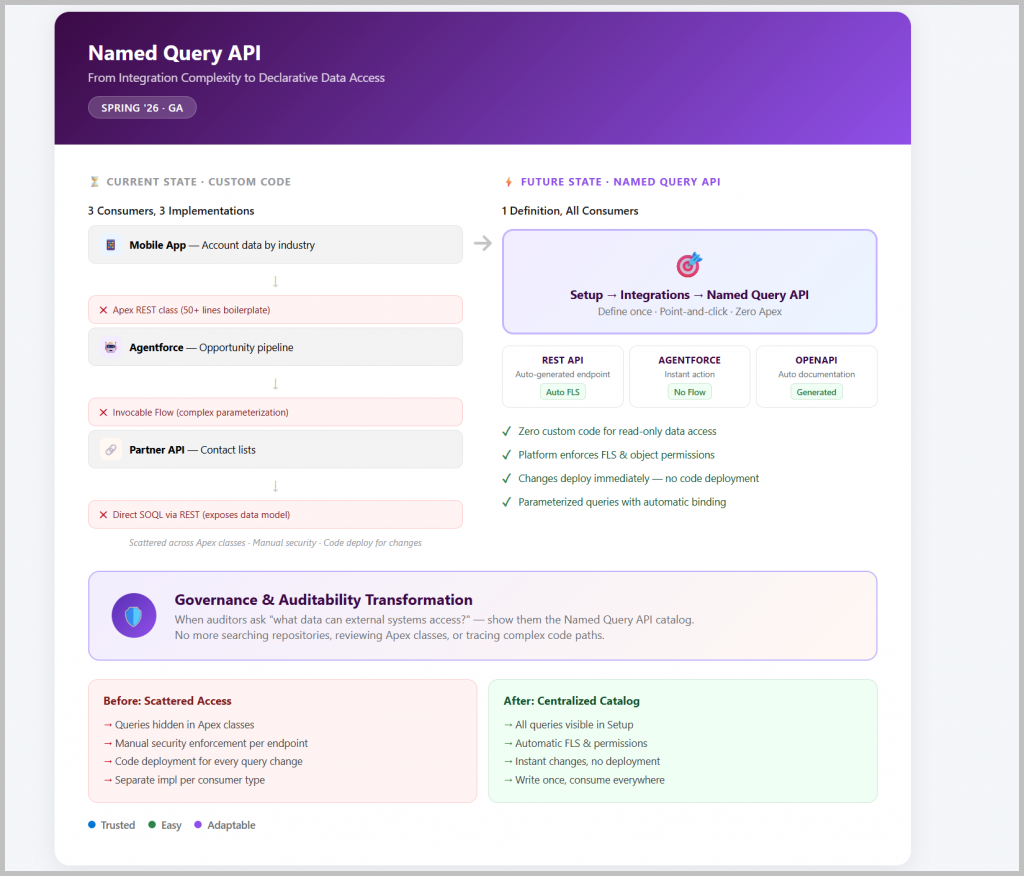
Named Query API (GA in Spring ’26) lets you define SOQL queries once in Setup, then automatically expose them as REST endpoints and Agentforce actions:
Step 1: Define Query in Setup
Navigate to Setup → Integrations → Named Query API
SELECT Id, Name, Industry, AnnualRevenue
FROM Account
WHERE Industry = :industry
ORDER BY CreatedDate DESC
LIMIT :maxRecords
Step 2: Salesforce Automatically Provides:
- REST API Endpoint:
GET /services/data/v66.0/named/query/AccountsByIndustry ?industry=Technology &maxRecords=50 - Agentforce Action – immediately available for agent configuration (no Apex, no Flow)
- OpenAPI Specification – downloadable documentation for your integration partners
What you get:
- ✅ Zero Apex code for data access
- ✅ Automatic FLS and object-level security
- ✅ Parameterized queries for flexibility
- ✅ Reusable across REST, Agentforce, future channels
- ✅ Version-controlled, governed data access
Architect’s Perspective: Governance and Security Simplification
I see the primary use case for Named Query API as providing read-only data from Salesforce that can be consumed by external applications—with security defined and configured entirely within Salesforce.
The architectural advantage is governance and auditability. Instead of creating custom code for every read-only query request, Salesforce teams can:
- Create scalable queries using a point-and-click interface in Setup
- Centralize all external data access in one location (Setup → Integrations → Named Query API)
- Audit from a security perspective much more easily—all queries are visible in one place rather than scattered across dozens of Apex classes in the codebase
This is transformational for security audits. When auditors or security teams ask “what data can external systems access from Salesforce?”, you can simply show them the Named Query API catalog. No need to search through repositories, review Apex classes, or trace through complex code paths.
My implementation recommendation: The Named Query API feature can wait for immediate implementation—it’s not something you need to rush into Spring ’26. However, the next time you receive a read-only integration request, this feature is a must-have. It should become your default approach for any scenario where:
- External applications need to query Salesforce data
- The use case is purely read-only (no DML operations)
- Security needs to be enforced at the Salesforce level
- You want to avoid custom Apex maintenance
Well-Architected Framework: Current State vs. Future State
| TRUSTED (Reliable, Compliant, Secure) | EASY (Engaging, Automated, Intentional) | ADAPTABLE (Composable, Resilient) | |
|---|---|---|---|
| Current State | ⚠️ Custom Apex requires manual security enforcement ❌ Security bugs possible in handwritten code ⚠️ Inconsistent security implementation across endpoints ❌ Difficult to audit which systems access which data ⚠️ Data access logic embedded in code (harder to review) | ❌ Requires developer resources for every data access request ❌ Admins can’t create or modify integration endpoints ⚠️ Long lead time from request to deployment ❌ Manual OpenAPI spec creation for documentation ❌ Separate implementation for Agentforce vs. REST consumers ❌ Custom code for parameter handling ⚠️ Data access patterns hidden in Apex classes ❌ No standardized naming or discovery mechanism ⚠️ Integration knowledge scattered across codebase | ❌ Each consumer type requires different implementation ❌ Tight coupling between data access and delivery mechanism ⚠️ Difficult to repurpose queries across channels ⚠️ API changes require code deployment and testing ❌ Versioning requires custom implementation ❌ Breaking changes impact all consumers simultaneously |
| Future State | ✅ Platform enforces FLS and object permissions automatically ✅ No custom security code to maintain or audit ✅ Consistent security model across all Named Queries ✅ Centralized query catalog in Setup ✅ Clear visibility into exposed data access patterns ✅ API Analytics tracks usage per Named Query | ✅ Admins with appropriate permissions can create Named Queries ✅ Point-and-click interface, no code required ✅ Changes deploy immediately (no code deployment) ✅ OpenAPI spec automatically generated ✅ Single query definition serves all consumers ✅ Platform handles parameter binding and validation ✅ Explicit catalog of available data queries ✅ Naming conventions enforced at creation ✅ Self-documenting via OpenAPI specifications | ✅ Write once, consume via REST API or Agentforce or future channels ✅ Loose coupling—query definition independent of consumer ✅ New consumer types can use existing queries ✅ API versioning built into platform ✅ Query modifications don’t require code deployment ✅ Consumers can pin to specific API versions |
The Bigger Picture: Strategic Architectural Direction
Looking at these three features together, I see Salesforce moving toward platform intelligence and developer productivity as core themes. The platform is taking on more responsibility—determining which tests to run, managing data processing state, and enforcing security automatically—freeing architects and developers to focus on business logic rather than infrastructure concerns.
This aligns with the broader Agentforce strategy: make the platform smarter so humans can work at a higher level of abstraction.
Three Key Takeaways
Based on my experience across 100+ implementations, here are my recommendations for Spring ’26 adoption:
1. Start with Run Relevant Tests + Critical Tests
Action: I would like dev teams to explore RunRelevantTests with critical tests to start with. This will help create release-independent test classes that always execute, regardless of what code changes.
Why now: Even though it’s Beta, the risk is low and the learning is high. Start identifying your critical business scenarios and marking those tests with @IsTest(critical=true). This forces the crucial conversation with business stakeholders about what actually matters.
Quick win: Pick 5-10 tests that validate your most important end-to-end business processes. Mark them as critical. Observe the deployment time savings on your next release.
2. Pilot Cursors for Your Most Painful Batch Job
Action: If you have batch jobs processing millions of records—especially those that always cause headaches in debugging—it’s worth trying the Cursor feature for one of the Apex classes.
Why now: Cursors are GA (Generally Available), so they’re production-ready. The investment in learning will pay off immediately on high-volume, complex processing scenarios.
Quick win: Identify one batch job that runs during business hours and causes record locking issues. Rewrite it as a cursor-based Queueable job with controlled batch sizes. Measure the reduction in user-reported locking errors.
3. Keep Named Query API in Your Back Pocket
Action: The Named Query API feature can wait for implementation. You don’t need to rush into it for Spring ’26. However, the next time you get a read-only integration request, this feature is a must to implement.
Why wait: Unless you have immediate integration needs, there’s no urgency. But when the need arises, Named Query API should become your default approach.
Quick win: Document your current custom REST endpoints. Identify which ones are purely read-only data access. Create a migration plan to Named Query API for the next time you need to modify those integrations.
Conclusion
Spring ’26’s developer features solve real problems I’ve encountered across enterprise Salesforce implementations: deployments take too long, data processing is too rigid, and integrations require too much custom code. Each capability directly addresses architectural pain points.
The Well-Architected Framework helps us evaluate these not as isolated features, but as improvements across Trusted, Easy, and Adaptable dimensions. Run Relevant Tests makes deployments reliable and fast. Apex Cursors bring flexibility to data processing. Named Query API simplifies and secures integration architecture.
Your move: Evaluate these features in your Spring ’26 sandbox. Measure the impact on deployment times, identify cursor candidates in your current Batch Apex inventory, and catalog your integration data access patterns. Small pilots with these capabilities can reveal significant architectural benefits.
What challenges are you solving with Spring ’26 features? Share your experiences and adoption plans in the comments. Feel free to post your comments below or email me at buyan@eigenx.com